Hierarchical Combo Filter with Search Example
This is an example of embedding Looker and creating a custom hierarchical filter component that interacts with the Looker iframe. The example showcases how to pull data from the Looker API using the Node SDK, modifying the API request to provide advanced search functionality and applying a custom component to the embedded Looker dashboard.
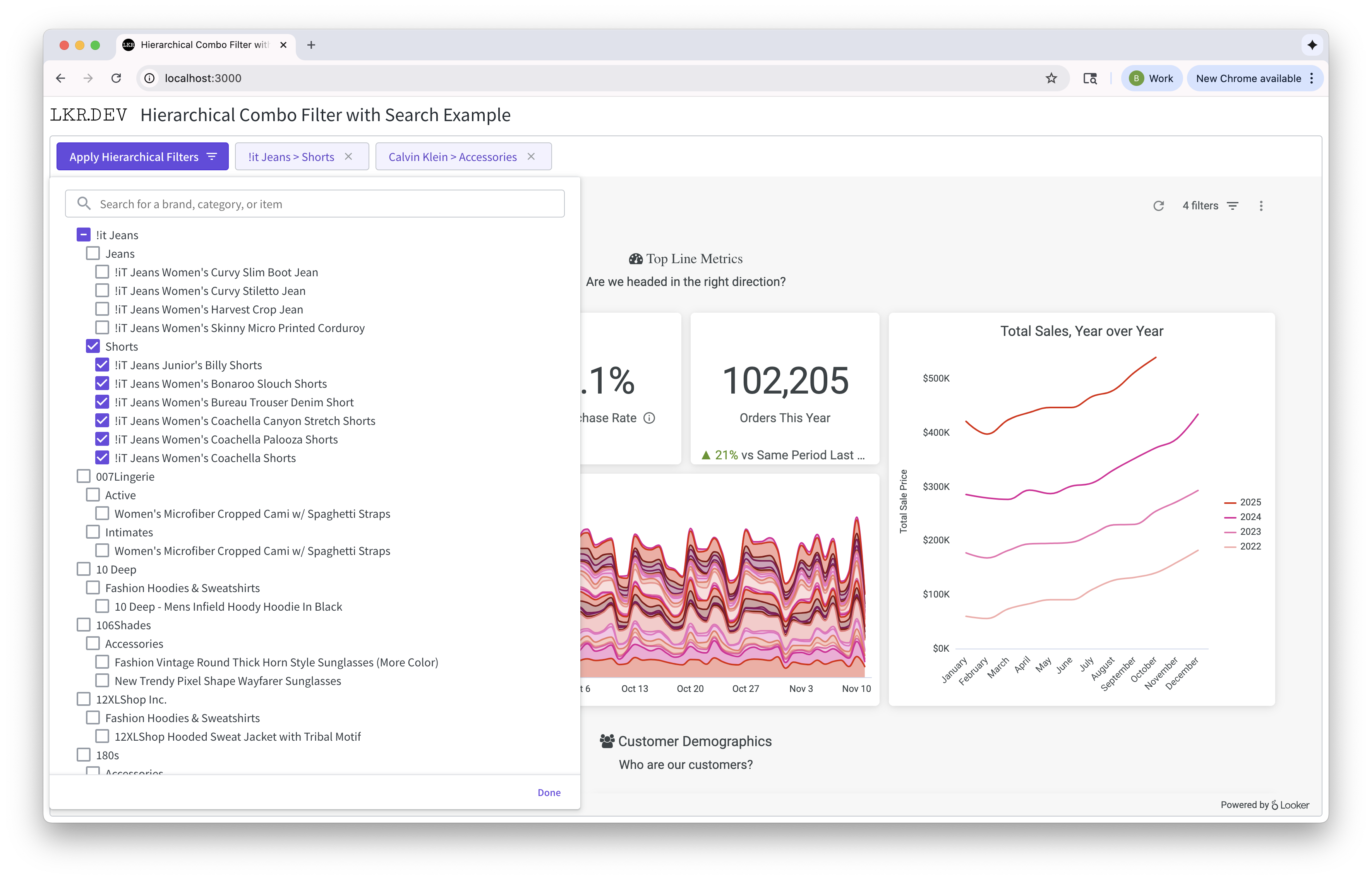
Demo
- Open the example at https://lkr.dev/examples/hierarchical-combo-filter-with-search.
- Click on the "Apply Hierarchical Filters" button to open the filter popover.
- Search for a brand, category, or item to filter the dashboard. For example, search for Calvin Klein or Jeans.
- Click on a brand, category, or item to select it.
- Click on Done in the bottom right of the popover to apply the filters.
- The dashboard will be updated to show the filtered data.
Embed SDK
Updating Iframe with Javascript events This example uses Looker's Javascript Events in order to facilitate an external filter.
- Mapping the hierarchy selection to proper dashboard parameter value
// connection is the SDK representation of a connected iframe with its helper methods.
const dashboard_connection = connection.asDashboardConnection();
dashboard_connection.updateFilters({ Hierarchical Filter: 'Brand: Calvin Klein, Category: Jeans' });
dashboard_connection.run();
Looker API SDK (Node)
Custom Filters and Looker Expressions
Looker filter expressions are a powerful way to filter queries in Looker. They allow the developer to write complex filters using Looker's DSL.
matches_filter(${products.brand}, `%Calvin%`) OR matches_filter(${products.category}, `%Jeans%`) OR ( matches_filter(${products.brand}, `%Calvin%`) AND matches_filter(${products.category}, `%Jeans%`) )
LookML Examples
- Comprehensive field searching
case_sensitive: nodocs
view: +products {
    dimension: brand {
        type: string
        case_sensitive: no
        sql: TRIM(${TABLE}.brand) ;;
    }
}
- Speeding up searches by using aggregate awareness
explore: +order_items {
  aggregate_table: rollup__products_brand__products_category__products_item_name {
    query: {
      dimensions: [products.brand, products.category, products.item_name]
    }
    materialization: {
      datagroup_trigger: ecommerce_etl_modified
    }
  }
}
- Creating a performant hierarchical filter with Looker's liquid variables
join: brand_category_item {
    sql:  ;;
    sql_where:
    {% assign counter = 0 %}
    {% assign items = brand_category_item.filter._parameter_value | replace: "$", " " | split: '..' %}
    {% assign brand = "" | split: "" %}
    {% assign category = "" | split: "" %}
    {% assign item_name = "" | split: "" %}
    {% for item in items %}
      {% assign f = item | split: '__' %}
      {% assign item_arr = item | split: ".." %}
      {% if f.size == 1 %}
      {% assign brand = brand | concat: item_arr %}
      {% elsif f.size == 2 %}
      {% assign category = category | concat: item_arr  %}
      {% elsif f.size == 3 %}
      {% assign item_name = item_name | concat: item_arr %}
      {% endif %}
    {% endfor %}
    {% for b in brand %}
      {% if forloop.first %} ( {% endif %}
      {% assign counter = counter | plus: 1 %}
      ( ${products.brand} = '{{ b }}' ) {% if forloop.last %}{% else %} OR {% endif %}
      {% if forloop.last %} ) {% endif %}
    {% endfor %}
    {% for c in category %}
      {% if forloop.first %} {% if counter > 0 %} OR ( {% else %} ( {% endif %} {% endif %}
      {% assign counter = counter | plus: 1 %}
      {% if counter > 0 %}{% else %}{% endif %}
      {% assign g = c | split: "__" %}
      ( ${products.brand} = '{{ g[0] }}' AND ${products.category} = '{{ g[1] }}' ) {% if forloop.last %}{% else %} OR {% endif %}
    {% if forloop.last %} ) {% endif %}
    {% endfor %}
    {% for i in item_name %}
      {% if forloop.first %} {% if counter > 0 %} OR ( {% else %} ( {% endif %} {% endif %}
      {% assign counter = counter | plus: 1 %}
      {% assign g = i | split: "__" %}
      (       ${products.brand} = '{{ g[0] }}'
          AND ${products.category} = '{{ g[1] }}'
          AND ${products.item_name} = '{{ g[2] }}'
      )
    {% if forloop.last %} ) {% endif %}
    {% endfor %}
    {% if counter == 0 %} 1=1 {% endif %}
  ;;
}


view: brand_category_item {
  parameter: filter { type: unquoted hidden: no}
}