Looker Access Token Reuse

· 3 min read

Think of an access token like a corporate security badge. You wouldn't stand in line at the front desk to print a new visitor pass every time you walk through an interior door. Instead, you simply swipe your active badge until it expires.

Similarly, when your scripts or API services call Looker, they shouldn't authenticate from scratch on every request. Repeatedly logging into the API or logging in as a user (/login/:user endpoint) not only adds unnecessary latency but also creates token bloat that can degrade server performance at scale.

A simple token cache solves this. By storing access tokens locally, you restore active sessions instantly. Because Looker binds workspace state (Production vs. Developer Mode) directly to the session token, a user can maintain simultaneous dev and production tokens. Reusing a token already pinned to Developer Mode avoids the network round-trip of switching workspaces on every command.

If you are ready to implement this, jump directly to the code samples.

Technical Strategy

To make this work, the authentication layer acts as middleware checking three conditions:

  1. Is there a valid token in memory?
  2. Is there a valid token in the local database?
  3. If a cached token is found, does it have enough remaining lifetime (TTL)?

If yes, we reuse it. If not, we run a fresh API login, save the new token with an absolute UTC expiration timestamp, and switch the workspace to Developer Mode if running in a development environment.

By building this caching logic into your Looker SDK client, your application can seamlessly pull and reuse valid tokens, verify TTL, request new tokens when necessary, and manage workspace branches automatically:

control flow

Calculating TTL

Looker access tokens default to returning a relative expires_in duration (default 3600 seconds). If your database simply stores "3600", your script won't know when that countdown started. Instead, compute and store the absolute UTC expiration timestamp upon receipt.

When restoring a token, subtract the current time from the stored expiration timestamp. We recommend enforcing a 10-second safety margin to prevent the token from expiring mid-request.

Why Pin the Workspace to Developer Mode?

When executing scripts during development, you should switch your session to the dev workspace immediately after logging in. This is critical for three reasons:

  • Testing uncommitted LookML: The SDK defaults to production. Setting the workspace to dev ensures queries execute against draft models and enables development-only endpoints.
  • Isolating automation: Running validation or CI scripts in Developer Mode prevents work-in-progress changes from polluting production settings or impacting live business users.
  • Reducing API round-trips: Switching workspaces requires a distinct API call. Restoring a cached token already flagged for dev mode avoids repeated network overhead.

Database Schema Suggestions

To support both standard and sudoed sessions, store tokens using a composite primary key of the client ID and target user ID:

CREATE TABLE IF NOT EXISTS token_store (
client_id TEXT NOT NULL,
sudo_user_id INTEGER, -- NULL for base client token; user ID for sudo sessions
access_token TEXT NOT NULL,
expires_at TEXT NOT NULL, -- Absolute UTC ISO8601 string or Unix timestamp
PRIMARY KEY (client_id, sudo_user_id)
);

Complete Code Examples

import json
import logging
from typing import Optional

from looker_sdk.rtl import api_settings, auth_session, auth_token, serialize, transport
from looker_sdk.sdk.api40 import methods

logger = logging.getLogger(__name__)


class DatabaseTokenAuthSession(auth_session.AuthSession):
"""
A custom Looker SDK AuthSession that attempts to reuse access tokens from a database
before requesting a new one. It handles TTL properly by calculating the remaining
token life relative to the absolute expiration time stored in the database.
It supports both base client tokens and sudoed user tokens.
"""

def __init__(
self,
settings: api_settings.PApiSettings,
transport: transport.Transport,
deserialize: serialize.TDeserialize,
api_version: str,
use_dev_mode: bool = True,
sudo_user_id: Optional[int] = None,
):
super().__init__(settings, transport, deserialize, api_version)
self.use_dev_mode = use_dev_mode
if sudo_user_id:
self._sudo_id = sudo_user_id

def _get_token(
self, transport_options: transport.TransportOptions
) -> auth_token.AuthToken:
"""
Retrieves a valid base token. Checks memory, attempts to restore from database,
or performs a login.
"""
# 1. Check if the in-memory token is still active (contains safety buffer)
if self.is_authenticated:
return self.token

# 2. Attempt to restore token from the database
restored_token = self._restore_token_from_db()
if restored_token:
self.token.set_token(restored_token)
if self.is_authenticated:
logger.info("Successfully restored active base token from database.")
return self.token

# 3. No active token in DB, delegate to super to authenticate and save
return super()._get_token(transport_options)

def _get_sudo_token(
self, transport_options: transport.TransportOptions
) -> auth_token.AuthToken:
"""
Retrieves a valid sudo token. Checks memory, attempts to restore from database,
or performs a sudo login.
"""
# 1. Check if the in-memory sudo token is still active
if self.is_sudo_authenticated:
return self.sudo_token

# 2. Attempt to restore sudo token from the database
restored_sudo_token = self._restore_sudo_token_from_db()
if restored_sudo_token:
self.sudo_token.set_token(restored_sudo_token)
if self.is_sudo_authenticated:
logger.info(
f"Successfully restored active sudo token for user {self._sudo_id} from database."
)
return self.sudo_token

# 3. No active sudo token in DB, delegate to super to authenticate and save
return super()._get_sudo_token(transport_options)

def _login(self, transport_options: transport.TransportOptions) -> None:
"""Overridden login to automatically persist base tokens to the database."""
super()._login(transport_options)
if self.use_dev_mode:
self._switch_to_dev_mode()
self._save_token_to_db(self.token)

def _login_sudo(self, transport_options: transport.TransportOptions) -> None:
"""Overridden sudo login to automatically persist sudo tokens to the database."""
super()._login_sudo(transport_options)
self._save_sudo_token_to_db(self.sudo_token)

def _restore_token_from_db(self) -> Optional[auth_token.AccessToken]:
"""
Placeholder logic to restore the base access token from your database.
Calculate the remaining TTL (expires_in) dynamically.
"""
# restore from your database using XYZ
#
# Example Implementation:
# ----------------------------------------------------
# client_id = self.settings.read_config().get("client_id")
# # Query your DB for token and its absolute expires_at:
# row = db.query(
# "SELECT access_token, expires_at FROM token_store WHERE client_id = ? AND sudo_user_id IS NULL",
# (client_id,)
# )
# if not row:
# return None
#
# # Parse stored absolute expiration and calculate remaining seconds
# expires_at = datetime.datetime.fromisoformat(row["expires_at"])
# now = datetime.datetime.now(datetime.timezone.utc)
# remaining_ttl = int((expires_at - now).total_seconds())
#
# # Return the token only if it has remaining lifetime above safety threshold
# if remaining_ttl > 10:
# return auth_token.AccessToken(
# access_token=row["access_token"],
# expires_in=remaining_ttl,
# token_type="Bearer"
# )
# ----------------------------------------------------
return None

def _save_token_to_db(self, token: auth_token.AuthToken):
"""
Placeholder logic to save the base access token and its absolute expiration time.
"""
# save to your database using XYZ
#
# Example Implementation:
# ----------------------------------------------------
# client_id = self.settings.read_config().get("client_id")
#
# # Calculate absolute expiration time based on current time + TTL
# now = datetime.datetime.now(datetime.timezone.utc)
# expires_at = (now + datetime.timedelta(seconds=token.expires_in)).isoformat()
#
# db.execute(
# "INSERT OR REPLACE INTO token_store (client_id, sudo_user_id, access_token, expires_at) "
# "VALUES (?, NULL, ?, ?)",
# (client_id, token.access_token, expires_at)
# )
# ----------------------------------------------------
pass

def _restore_sudo_token_from_db(self) -> Optional[auth_token.AccessToken]:
"""
Placeholder logic to restore the sudo access token from your database.
Calculate the remaining TTL (expires_in) dynamically.
"""
# restore from your database using XYZ
#
# Example Implementation:
# ----------------------------------------------------
# client_id = self.settings.read_config().get("client_id")
# # Query your DB for token and its absolute expires_at:
# row = db.query(
# "SELECT access_token, expires_at FROM token_store WHERE client_id = ? AND sudo_user_id = ?",
# (client_id, self._sudo_id)
# )
# if not row:
# return None
#
# # Parse stored absolute expiration and calculate remaining seconds
# expires_at = datetime.datetime.fromisoformat(row["expires_at"])
# now = datetime.datetime.now(datetime.timezone.utc)
# remaining_ttl = int((expires_at - now).total_seconds())
#
# # Return the token only if it has remaining lifetime above safety threshold
# if remaining_ttl > 10:
# return auth_token.AccessToken(
# access_token=row["access_token"],
# expires_in=remaining_ttl,
# token_type="Bearer"
# )
# ----------------------------------------------------
return None

def _save_sudo_token_to_db(self, token: auth_token.AuthToken):
"""
Placeholder logic to save the sudo access token and its absolute expiration time.
"""
# save to your database using XYZ
#
# Example Implementation:
# ----------------------------------------------------
# client_id = self.settings.read_config().get("client_id")
#
# # Calculate absolute expiration time based on current time + TTL
# now = datetime.datetime.now(datetime.timezone.utc)
# expires_at = (now + datetime.timedelta(seconds=token.expires_in)).isoformat()
#
# db.execute(
# "INSERT OR REPLACE INTO token_store (client_id, sudo_user_id, access_token, expires_at) "
# "VALUES (?, ?, ?, ?)",
# (client_id, self._sudo_id, token.access_token, expires_at)
# )
# ----------------------------------------------------
pass

def _switch_to_dev_mode(self):
"""Switches the session workspace to Developer Mode."""
config = self.settings.read_config()
base_url = config.get("base_url")
if not base_url:
return

url = f"{base_url}/api/{self.api_version}/session"
try:
logger.info("Switching session workspace to developer mode (dev)...")
self.transport.request(
method=transport.HttpMethod.PATCH,
path=url,
body=json.dumps({"workspace_id": "dev"}).encode("utf-8"),
transport_options={
"headers": {
"Content-Type": "application/json",
"Authorization": f"Bearer {self.token.access_token}",
}
},
)
except Exception as e:
logger.warning(f"Failed to switch to dev mode: {e}")


def init_sdk(
use_dev_mode: bool = True,
sudo_user_id: Optional[int] = None,
) -> methods.Looker40SDK:
"""
Initializes the Looker SDK with the custom DatabaseTokenAuthSession.
Configured settings are automatically read from standard settings (environment or looker.ini).
"""
settings = api_settings.ApiSettings()
settings.is_configured()

transport_inst = transport.RequestsTransport.configure(settings)

custom_auth = DatabaseTokenAuthSession(
settings=settings,
transport=transport_inst,
deserialize=serialize.deserialize40,
api_version="4.0",
use_dev_mode=use_dev_mode,
sudo_user_id=sudo_user_id,
)

return methods.Looker40SDK(
auth=custom_auth,
deserialize=serialize.deserialize40,
serialize=serialize.serialize40,
transport=transport_inst,
api_version="4.0",
)


if __name__ == "__main__":
logging.basicConfig(level=logging.INFO)

# Example initialization (will print logs of actions taken)
try:
sdk = init_sdk(use_dev_mode=True, sudo_user_id=None)
print("Looker SDK successfully initialized.")
except Exception as e:
print(f"SDK initialization failed: {e}")

Benchmarking Conversational Analytics: Looker Semantic Layer vs. Direct SQL

· 8 min read

Semantic Layer Importance in Agentic AI

There is a continued discussion over the need for a semantic layer to support enterprise scale deployments of conversational analytics and agentic data applications. Frequently referenced is a 2024 paper using GPT 4, which is one of the few quantitative assessments published in the public domain demonstrating the value of a semantic layer. The state of LLMs, including reasoning improvements and context adherence, continues to evolve, and existing benchmarks such as this quickly turn stale.

Recently, DBT put out a blog post with their own updated 2026 benchmark comparing Text-to-SQL against the DBT semantic layer, highlighting the benefits of the semantic layer. Unfortunately, this benchmark had limitations on the scope of the evaluation (e.g., only using 11 questions from the source benchmark, minimal context engineering).

This study set out to expand on the prior art by leveraging the same dataset, but with an expanded set of questions and a more comprehensive evaluation harness.

The Results: In testing across three consecutive runs, the Looker semantic layer (NL2LookML) demonstrated strong performance, averaging 97% accuracy and reaching up to 100% accuracy in generating equivalent data results in one run. The BigQuery direct approach (NL2SQL), after optimisation with structured context and custom system instructions, reached an accuracy as high as 84%, averaging 80%.

These results highlight the importance of a governed semantic layer in ensuring consistent and accurate results are delivered in agentic data applications.


Methodology

The Benchmark Dataset

This experiment is based on the data.world benchmark for conversational data analytics, specifically adapting the ACME Insurance dataset. The custom Looker semantic model (including LookML views, explores, and join relationships) designed for this dataset is open source and available in the acme_insurance_looker repository.

The benchmark consists of:

  • A set of 44 natural language business questions.
  • A Golden Query (Ground Truth) for each question, expressed in SQL and SparQL, representing the correct way to answer the question against the database.

The benchmark expressed in TTL format had to be adjusted to correctly support BigQuery Standard SQL (i.e., column name scoping) and address incorrect evaluation criteria (i.e., columns required in the golden query that should not be a requirement based on the business question).

The Backends Evaluated

Two distinct approaches supported by the Gemini Data Analytics (Conversational Analytics) API were evaluated:

  1. Looker Backend (NL2LookML): The API is provided with references to Looker Semantic Layer Explores using a BigQuery connection. It translates the user's question into a Looker semantic query (JSON), which is then executed by Looker to generate the final SQL and retrieve results from BigQuery. The SQL is deterministically written based on the metrics and join logic in the Looker semantic model. Two Looker Explores were built to support the benchmark.
  2. BigQuery Backend (NL2SQL): The API is provided with raw table references and schema definitions. It translates the user’s question directly to standard BigQuery SQL. Additional metadata can be provided through the API as extra context or table metadata.

The Evaluation Harness

The benchmark is executed and analyzed using a custom evaluation harness. The full source code for the harness, alongside evaluation assets and configuration files, is public and available in the gemini-data-analytics-ca-bench repository.

The evaluation harness automates the following steps for each challenge:

  1. Executes the Golden Query against BigQuery to get the "Ground Truth" result set.
  2. Calls the Gemini Data Analytics API with the Looker context to get the Looker result set.
  3. Calls the Gemini Data Analytics API with the BigQuery context to get the BigQuery result set.
  4. Compares the result sets from both backends against the Ground Truth using an advanced result set matching service.

Advanced Result Set Matching Traditional string-based comparison of generated SQL fails because LLMs can write many equivalent SQL variations or rename columns. The methodology used here relies on value-based column mapping:

  • It maps columns between the generated result and the golden result by looking at the actual data values using Jaccard similarity.
  • It handles data type coercions (e.g., strings representing numbers) and floating-point tolerances.
  • It assesses true data equivalence regardless of column names or row ordering.

Optimising for Accuracy

Looker: The Power of the Semantic Layer The LookML semantic layer was built using recursive self-improvement guided by AI, followed by final human curation. By defining relationships, dimensions, and measures in LookML, we provided the AI with a rich, governed map of how the data should translate to SQL deterministically. Looker handled complex fanouts through symmetric aggregates, protecting the LLM from making common SQL join errors.

BigQuery: The Importance of Authored Context Direct NL2SQL against BigQuery proved more challenging for the LLM, especially regarding complex join paths and grain ambiguity. Significant improvements were realised by leveraging context about the table relationships and column metadata. Accuracy started at 30% before adding in the context. The context was generated through recursive self-improvement using AI.


The Results

The benchmark was run three times to assess consistency. All runs processed 44 total questions.

Conversational Analytics BackendAverage Answer CorrectnessAverage Run Success Rate
BigQuery80%100%
Looker97%99%

Breaking down by run, the Looker backend achieved 100% accuracy in one run and failed a few questions in the other two runs. The failures were not consistent, suggesting minor LLM generation variance rather than structural model issues. Only 4 distinct questions failed at least once across all runs, and none failed in all 3 runs.

The BigQuery backend showed a set of "hard" questions that failed consistently: 7 questions failed in all 3 runs. These are primarily complex questions involving Loss Ratio calculations, multi-hop joins linking Agents and Policy Holders to claims, and queries requesting individual premium listings without aggregation. The remaining failures varied, with 1 question failing in 2 out of 3 runs, and 4 questions failing in 1 out of 3 runs.

Run IDBigQuery Result SuccessLooker Result SuccessBigQuery Answer EquivalenceLooker Answer Equivalence
run_20260430_20141344/44 (100%)44/44 (100%)35/44 (80%)43/44 (97%)
run_20260430_20310044/44 (100%)43/44 (97%)33/44 (75%)41/44 (93%)
run_20260430_21005344/44 (100%)44/44 (100%)37/44 (84%)44/44 (100%)

All three benchmark runs can be reviewed in detail using the interactive Streamlit results visualization app included in the evaluation repository.

Interactive review of benchmark results in the Streamlit app, detailing query success, equivalence, and run-by-run consistency.

Streamlit Benchmark Results

Conclusion

This benchmark demonstrates that a governed semantic layer significantly elevates the accuracy and reliability of conversational analytics. With Looker consistently achieving higher accuracy (averaging 97% compared to 80% for direct BigQuery SQL), it is the superior choice for scaling trusted, self-service business intelligence where precision is non-negotiable.

However, direct NL2SQL remains a powerful tool for complex, exploratory data analysis. While it demands investment in authored context to mitigate the risks of model hallucinations or join errors, it provides the flexibility required by data practitioners who need to perform ad-hoc or non-standard analytical patterns.

Ultimately, the decision between these approaches should be driven by the use case: choose the semantic layer for governed, enterprise consistency at scale, and reserve direct SQL for specialised, exploratory workflows. As the field matures, we expect the gap between these capabilities to narrow, but current results underscore the importance of semantic governance to drive successful conversational analytics deployments.


Evaluation Resources

All assets, datasets, semantic models, and tools built for this study are open source and public on GitHub:

  • Evaluation Harness & Benchmarking Suite: gemini-data-analytics-ca-bench contains the execution script, value-based result equivalence comparison service, instructions, log files, and the Streamlit data review application.
  • Looker Semantic Model (LookML): acme_insurance_looker contains the LookML semantic models, views, and explores developed to map the ACME Insurance dataset structure for governed NL2LookML analytics.

Known Limitations & Next Steps

While this benchmark provides a good starting point, the approach has known limitations:

  1. The golden questions are all descriptive analytics and do not represent complex analytical patterns (e.g., custom window functions, conditional groupings). In these cases, Looker semantic models would need to be designed very robustly to support these use cases and are often better suited for NL2SQL.
  2. The evaluation does not include complex multi-step query execution or agentic post-processing of results that can occur. LLMs as a judge would be a better approach for this type of evaluation. Alternative evaluation methodologies are available in other open-source tools (like the Looker eval cli or Prism.

SQL "Inception": Recursive CTEs, BigQuery + Looker

· 5 min read

Have you ever needed to query a data structure where you didn't know how deep the relationships went? Think of an organizational chart, a complex product assembly (Bill of Materials), or a nested comment thread like Hacker News.

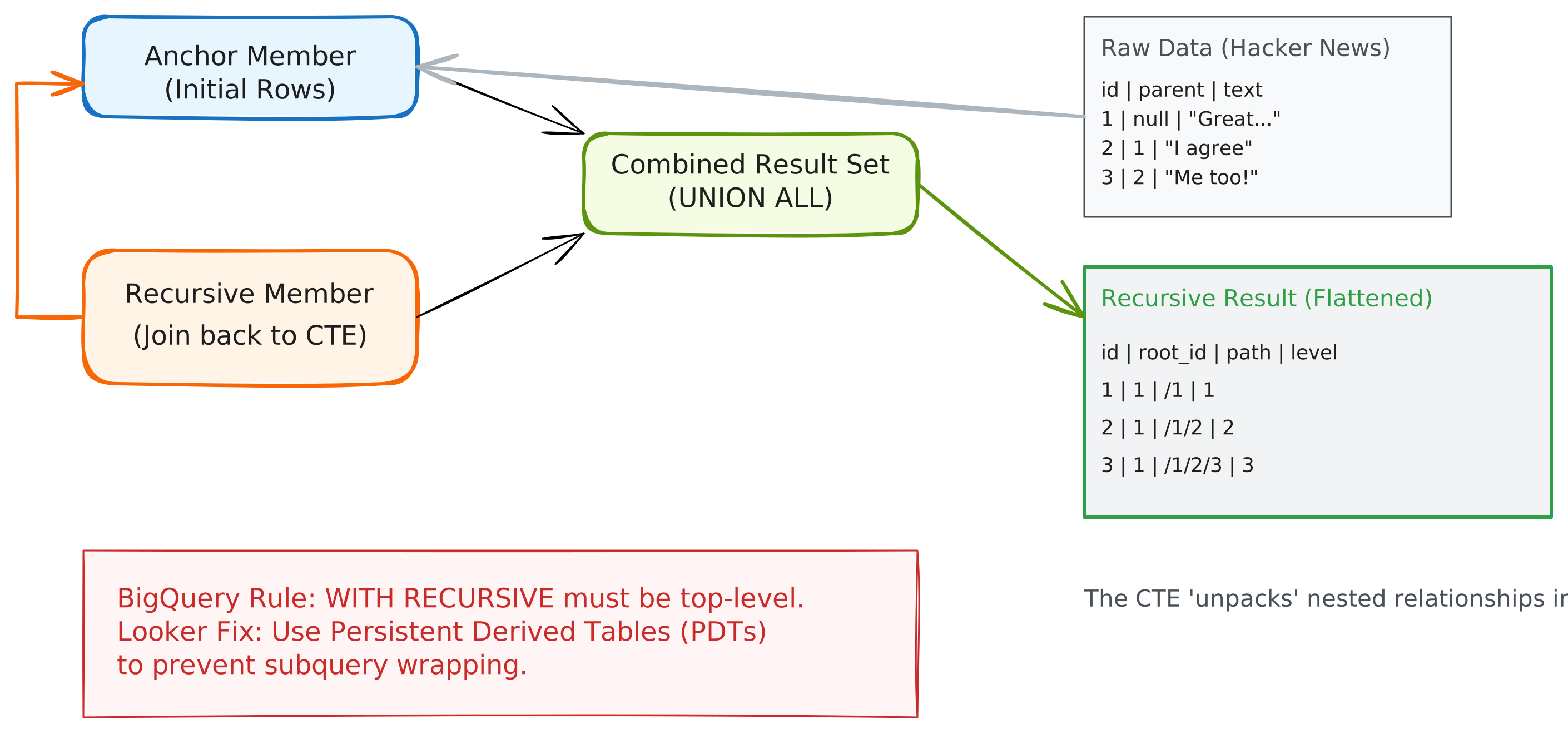
recursive-cte-flow-chart

Standard SQL joins fail here because they require you to know the number of levels upfront. Enter the Recursive Common Table Expression (CTE)—a powerful tool that allows a query to reference itself, iterating through levels until a termination condition is met.

In this guide, we’ll explore why recursive CTEs are a game-changer, how to implement them in BigQuery, and the specific architectural patterns required to make them work seamlessly in Looker.

Download the Code

Want to skip ahead and see the final LookML? Download the full source code here

Why Recursive CTEs?

Recursive CTEs are designed for hierarchical or graph-based data. Without them, you are often forced to write inefficient loops in a scripting language or perform multiple, expensive joins.

Top Use Cases:

  • Organizational Hierarchies: Finding every employee under a specific manager, regardless of level.
  • Network Analysis: Traversing a graph to find paths between nodes (e.g., "Degrees of Separation").
  • Threaded Conversations: Analyzing comment chains, replies, and sub-threads (our Hacker News example).
  • BOM (Bill of Materials): Exploding a product into all its constituent parts and sub-assemblies.

Recursive CTEs in BigQuery

BigQuery uses a standard syntax for recursion, consisting of three parts: the Anchor Member, the Recursive Member, and the Termination Condition.

The Syntax Pattern:

WITH RECURSIVE hierarchy AS (
-- 1. Anchor Member: Where do we start?
SELECT id, parent, 1 as level
FROM my_table
WHERE parent IS NULL

UNION ALL

-- 2. Recursive Member: How do we get to the next level?
SELECT child.id, child.parent, parent.level + 1
FROM my_table child
JOIN hierarchy parent ON child.parent = parent.id

-- 3. Termination: BigQuery has a hard limit of 500 iterations.
-- Ensure your join eventually returns no rows to stop.
)
SELECT * FROM hierarchy
BigQuery Constraint

WITH RECURSIVE MUST be at the very top level of your SQL statement. It cannot be inside a subquery. This leads to a small challenge in Looker we will overcome later.


The "Looker Trap" and the PDT Solution

When you define a SQL Derived Table in Looker, the generated SQL typically looks like this:

WITH my_derived_table (
SELECT ... -- Your Derived Table SQL here

)
SELECT ... FROM my_derived_table GROUP BY ... ORDER BY ...

If your Derived Table SQL starts with WITH RECURSIVE, Looker wraps it in a subquery, pushing the WITH clause down. BigQuery will reject this query.

The Solution: Persistent Derived Tables (PDTs)

To use recursive CTEs in BigQuery with Looker, you must use a Persistent Derived Table. When Looker builds a PDT, it uses a CREATE TABLE AS SELECT (CTAS) statement. Because the PDT build process executes the SQL as a standalone statement, the WITH RECURSIVE stays at the top level, and the query succeeds.

view: hn_hierarchy {
derived_table: {
datagroup_trigger: my_datagroup
# persist_for: "1 hour" # we recommend using a datagroup_trigger, but using persist_for works too
# Using a trigger or persist_for is mandatory to enable PDT behavior
sql:
WITH RECURSIVE hierarchy AS (
...
)
SELECT * FROM hierarchy ;;
}
}

Real-World Implementation: Hacker News

We analyzed the Hacker News dataset (47 million rows) to find the deepest comment threads. Using a recursive CTE joined to the main table, we uncovered fascinating insights:

  • Record Depth: The deepest thread reached 65 levels deep!
  • Pre-Aggregated Stats: By using a window function in our recursive view, we calculated total story comments as a dimension: COUNT(1) OVER(PARTITION BY root_id) as story_total_comments This allows users to sort by a story's total popularity while still viewing individual comment text in the same row.

A premium Looker implementation doesn't just show data; it provides a path to action.

Enable Detail Drills

Aggregated counts should always allow users to see the underlying rows. We enabled this by adding drill_fields to our recursive measures:

measure: count {
type: count
drill_fields: [id, parent, root_id, hacker_news.text]
}

Connect to Reality

Using Looker’s link parameter, we added external links to the original Hacker News articles. With the Google favicon lookup, the UI feels integrated and professional:

dimension: id {
link: {
label: "View on Hacker News"
url: "https://news.ycombinator.com/item?id={{ value }}"
icon_url: "https://www.google.com/s2/favicons?domain=news.ycombinator.com"
}
}

Hackernews Dashboard

Summary: Best Practices for Looker Developers

  • Materialize: Always persist recursive CTEs in BigQuery.
  • Window Functions: Use them within your CTE to pre-calculate hierarchy-wide stats for better Explore performance.
  • Liquid Guards: If using Query-Time Derived Tables (on other dialects), use {% condition %} to filter the anchor member early.

Recursive CTEs turn impossible data challenges into elegant LookML solutions. By understanding the warehouse-specific constraints and Looker's persistence model, you can unlock hierarchical insights that were previously out of reach.

Introduction to Looker Code Mode MCP

· 5 min read

Today we're introducing the lkr code-mode MCP server to allow your LLM to orchestrate all of Looker API's in a simple interface. The Model Context Protocol (MCP) is a great way to connect AI agents to external tools. But as agents connect to bigger APIs, we run into a big problem: context bloat. Looker actually tried to fix this by creating a trimmed-down version of its MCP that exposes only a few select APIs. But that's pretty limiting if you want to build complex workflows and those workflows require many back and forth tool calls. Code Mode flips this on the head, the LLM writes code to orchestrate the entire workflow in one go; that's why developers are moving towards Code Mode for these use cases.

Think of traditional MCP as requiring a separate phone call to a worker for every step of a project (e.g., "Check the file," "Now read the first line," "Now delete the file"). Code Mode is like sending the worker a short Python script that does all three steps in one go. It saves time, reduces miscommunication, and gets the job done much faster.

What exactly is Code Mode?

Normally, you have to feed the AI the full JSON schema for every tool you want it to use if you have an API with hundreds of endpoints, which eats up almost your entire token budget to explain what each tool does, leaving no room for the actual conversation. Instead of listing hundreds of separate tools, Code Mode gives the LLM a compact, typed interface (basically a small SDK). The AI writes a script (usually in Python or JavaScript) to do what it needs, then runs it in a secure sandbox (such as a V8 isolate or a Python sandbox).

Cloudflare and Anthropic have been pushing this pattern because it shifts the model from "calling tools one by one" to "writing code to get the job done."

Why is it better

  • You collapse a massive API into a tiny interface, which saves a ton of tokens. Cloudflare reported cutting its token usage by 99.9% when it tried this.
  • The agent can write loops, conditions, and process data all in one go, instead of ping-ponging back and forth with the LLM for every single step.
  • Running code is deterministic. It either works or it doesn't, making it much easier to debug than an LLM guessing which tool to call next.

How we built it at lkr.dev

We wanted to solve this token bloat problem and receive the full API and SDKs for Looker, so we built a Python-based MCP server called lkr code-mode.

Here is how it works under the hood:

  • Instead of giving the agent hundreds of Looker SDK methods, we give it exactly one: run_python_code(code: str).
  • The tool spins up the Looker SDK, finds all the available methods, and passes them into the sandbox as global functions.
  • We use the Monty sandbox to run the code, so it can't mess with your local filesystem or network.
  • We convert complex Looker objects into standard Python dictionaries so the script can handle them easily.
  • If the session expires, Code Mode automatically pops up the PKCE auth browser to refresh the token without failing the run.

Check out the full Code Mode Docs and the CLI README for setup details.

What Can You Do with Looker Code Mode?

With a full Python environment and access to the Looker SDK, you can build some pretty cool workflows. Here are a few ideas:

Instance Governance & Cleanup

  • The "Marie Kondo" Content Archiver: Automatically find and archive dashboards and Looks that haven't been viewed in over 90 days.
  • Orphaned Schedule Rescuer: Find scheduled emails where the owner's account has been disabled and reassign them to prevent silent failures.

Developer & Performance Tools

  • Dashboard Performance Profiler: Test the load time of every tile on a dashboard by running queries asynchronously to find bottlenecks.
  • LookML "Impact Radius" Analyzer: Search for all Dashboards and Looks containing a specific field before deleting or changing it.

Dynamic Automation & Alerting

  • Smart Escalation Router: Dynamically route alerts to managers based on data conditions and user attributes.
  • The "Morning Briefing" Generator: Create personalized daily digest dashboards on the fly and export them as PDFs.

Advanced Migrations & Syncing

  • Environment Synchronizer: Replicate folder structures, permissions, and roles from a staging instance to production.
  • Bulk Onboarding Machine: Onboard 100+ users in seconds from a CSV, setting up credentials, user attributes, and row-level security.

What others are saying

  • On Cloudflare, they've been talking a lot about this, showing how they use Code Mode to let agents use their massive API without hitting token limits.
  • On Reddit (r/ClaudeAI, r/LLMDevs), developers agree that this isn't replacing MCP, but rather making it actually usable for big projects. A lot of the discussion focuses on how to build secure sandboxes.
  • On Hacker News, the consensus is that LLMs are just better at writing code than trying to figure out complex JSON tool schemas.

The Bottom Line

Code Mode is a big deal for making AI agents actually useful for complex tasks. By letting them write code instead of just calling API endpoints one by one, we can work around token limits and build much more reliable automation.

Looker Embed with BigQuery OAuth

· 4 min read

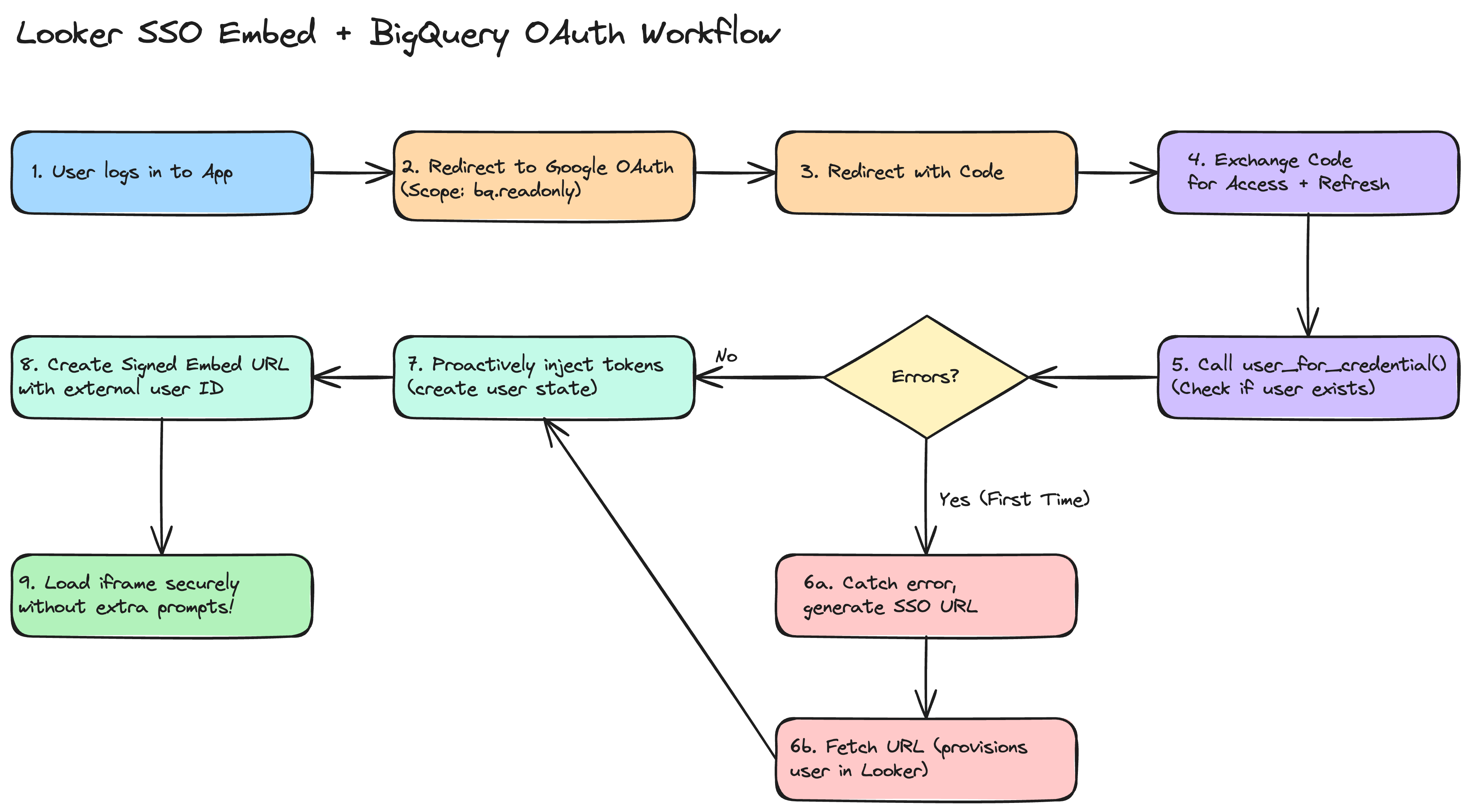
This implementation guide explains how to embed Looker dashboards backed by Google BigQuery with OAuth into your custom application smoothly, eliminating the "double authentication" phase in the iframe. There is a reference example repository, looker_oauth, made by Sam Pitcher. The code samples here are in Python, but can be done in any server-side framework.

alt text

GCP & Looker Setup

GCP OAuth Credentials

  • In the Google Cloud Console, create a single OAuth 2.0 Client ID.
  • Update your Authorized redirect URIs to list BOTH:
    • Your Looker instance native redirect URI (https://example.cloud.looker.com/external_oauth/redirect).
    • Your host application's OAuth callback URL, for example, https://app.example.com/auth/callback

Connect BigQuery to Looker

  • In the Looker Admin panel, proceed to connections and establish a Google BigQuery connection.
  • Select Authentication with OAuth and plug in your client credentials from GCP.
  • Find the generated application ID by running all_external_oauth_applications via the Looker SDK or API. We recommend using the API Explorer if you have it installed; here is a relative link for use in your Looker UI: /extensions/marketplace_extension_api_explorer::api-explorer/4.0/methods/Connection/all_external_oauth_applications

Application Level Login & Token Fetching

When users access your app, you must authorize them through Google OAuth 2.0. In your authorization redirect URL, configure exactly these dimensions:

Scopes & Access Type

Make sure your framework requests:

Sample Callback Logic

Once Google redirects to your server with the temporary authorization code, invoke standard Google OAuth API calls to fetch tokens:

# Capture Code dimension
code = request.args.get("code")

# Prepare token request using your standard Web Application Client
token_response = requests.post(
"https://oauth2.googleapis.com/token",
data={
"code": code,
"client_id": GOOGLE_CLIENT_ID,
"client_secret": GOOGLE_CLIENT_SECRET,
"redirect_uri": REDIRECT_URI,
"grant_type": "authorization_code",
}
)

response_payload = token_response.json()
access_token = response_payload.get("access_token")
refresh_token = response_payload.get("refresh_token")
expires_in = int(response_payload.get("expires_in"))

Token Synchronization via Looker SDK

Immediately after capturing Google tokens (access/refresh), proactively insert them into Looker using an Admin Looker SDK instance:

Locate the Embed User Identity

In this article, we won't go into the details of Signed Embedding or Cookieless Embedding; we assume you already know what they are, and that a user on the Looker side has already been created. In either of these methods, Looker creates unique embed users tied to the external_user_id that you pass in the SSO URLs. Fetch the user's internal Looker identifier using user_for_credential:

looker_user = sdk.user_for_credential(
credential_type='embed',
user_id=current_user.your_user_id # The external_user_id you use in SSO
)
warning

If this is the absolute first time that a user authenticates into Looker with this external_user_id and you're using signed embedding, then user_for_credential will error. You should catch this error, then create an SSO embed URL and fetch the URL to create the user.

Inject OAuth State into Looker

Construct the user state update parameters and pass them to create_oauth_application_user_state:

body = looker_sdk.models40.CreateOAuthApplicationUserStateRequest(
user_id=looker_user.id,
oauth_application_id=LOOKER_OAUTH_APPLICATION_ID,
access_token=access_token,
access_token_expires_at=datetime.datetime.now() + datetime.timedelta(seconds=expires_in),
refresh_token=refresh_token,
refresh_token_expires_at=datetime.datetime.now() + datetime.timedelta(days=180) # Common refresh expiry
)

sdk.create_oauth_application_user_state(body)

Creating the SSO URL

Once the user's access token matches successfully in Looker, issue a standard Signed Embed URL for them to use when loading the iframe. When creating the Signed Embed URL payload via create_sso_embed_url. If you are using cookieless_embedding, see this document on acquiring user attributes

warning

Make sure to provide the same exact user identification (like their email) used above.

When to Trigger

We strongly recommend using the embed-sdk package to kick off this flow with getEmbedSDK().init() & getEmbedSDK().preload() and then display the iframe without any data, and then use getEmbedSDK.loadExplore() or getEmbedSDK.loadDashboard() to load the proper data into the iframe when you need it.

Troubleshooting Checklist

If users are still prompted for authentication within the iframe, verify the following:

  • Missing Refresh Token: Ensure you requested access_type='offline' and prompt='consent' in the Google OAuth redirect. Without this, Google won't return a refresh token, and Looker will be unable to refresh expired access tokens after 60 minutes automatically.
  • Scope Mismatch: Verify that the scopes requested on application login cover exactly the necessary BigQuery scopes (e.g., https://www.googleapis.com/auth/bigquery.readonly).
  • Mismatched External User ID: The external_user_id used in the Signed SSO Embed URL must exactly match the user_id used to pull the user identity in user_for_credential before state injection.
  • Looker User Provisioning: In Signed SSO Embedding, Looker only creates the user profile on the first successful load of an SSO URL. If you try to fetch the user state before they've ever visited, user_for_credential will fail. In your server-side logic, if user_for_credential fails, provision the user by either fetching the URL or properly capturing the error.

Demystifying Looker's Custom Visualization Framework

· 8 min read

In modern business intelligence, the ability to tailor data presentations to precise business needs is paramount. While Looker provides an extensive suite of standard charts and tables, organizations frequently encounter unique requirements such as specialized network graphs, custom geographic overlays, or highly interactive d3-based visualizations.

Looker addresses this need with its Custom Visualization Framework, which lets you run arbitrary third-party JavaScript code seamlessly within a governed BI environment. However, executing external JavaScript within an enterprise application introduces significant security challenges, primarily around Cross-Site Scripting (XSS), data exfiltration, and unauthorized DOM access.

In this deep dive, we will explore the architecture of the Custom Visualization API, the mechanics of its secure loading strategy, and best practices for safely hosting custom visualization assets.


The Custom Visualization Architecture

At its core, a Looker custom visualization is an event-driven application running inside a specialized container. Rather than directly injecting custom JavaScript into Looker's main DOM window, which would be a massive security vulnerability, Looker decouples the visualization logic from the primary host application.

API 2.0 Lifecycle Hooks and Optimization

Looker's Visualization API 2.0 establishes a structured contract built for modern asynchronous workflows:

  1. Initialization: An initial setup phase constructs the required DOM container, loads necessary external drawing modules, and initializes state before any data arrives.
  2. Asynchronous Updates: Rather than blocking the main thread, API 2.0 relies heavily on asynchronous updates. The host dynamically pushes new datasets, configuration options, and metadata to the visualization container.

Optimizing for PDF and Headless Rendering

A key advantage of the API 2.0 architecture is its native support for PDF exports and scheduled deliveries. Looker passes a specialized context to the visualization to signal when it is rendering for a print or export job. Visualizations can optimize this headless flow by:

  • Disabling complex or resource-heavy micro-animations.
  • Emitting a precise completion signal back to the host immediately once the chart finishes drawing, ensuring the captured PDF is perfectly rendered without arbitrary timeouts.

Secure Interactive Capabilities

Visualizations built with API 2.0 can provide rich user interactions, such as drill menus, dynamic row limits, and cross-filtering, without directly accessing the host application's memory. By dispatching strict, serialized trigger events back to the host, the visualization can securely update filters or open drill overlays within the parent application.


Strict Security and Sandboxing

Executing user-supplied JavaScript inside a high-trust BI platform requires robust defense-in-depth. Looker achieves this through strict iframe sandboxing and isolation.

Iframe Isolation

Every custom visualization is rendered within a dynamically generated iframe that is strictly isolated from the primary application. Looker applies rigorous sandbox attributes to these iframes:

  • Script Execution: The sandbox explicitly allows scripts (allow-scripts) so the custom visualization code can run and compute layouts.
  • Restricted Capabilities: By default, the iframe lacks permissions to access the parent window's DOM, access local storage or cookies belonging to the primary Looker domain, or initiate top-level navigation away from the BI application.
    • No DOM Access: Prevents Cross-Site Scripting (XSS) and UI redressing, ensuring malicious scripts cannot alter dashboard tiles, capture keystrokes, or inject fake login modals to harvest credentials.
    • No Local Storage or Cookies: Secures active session tokens and API keys from being read or exfiltrated to external servers, preventing session hijacking.
    • No Top-Level Navigation: Ensures that a compromised script cannot redirect the browser to a spoofed phishing site or unauthorized domain.

Prevention of Data Exfiltration and XSS

By enforcing a distinct origin and sandboxed context, any malicious script embedded within a visualization is isolated. It cannot scrape Looker application cookies, intercept authentication tokens, or manipulate the user interface of the broader Looker application. All interaction with the BI environment must be explicitly serialized and passed via the Chatty message broker, which sanitizes and validates incoming events.


Registration, Loading, and Hosting Strategies

A critical aspect of maintaining security is managing how custom visualization JavaScript files are introduced to Looker. Administrators can register custom visualizations through two primary methods:

  1. LookML Manifest Files: By defining a visualization parameter in the project's manifest.lkml, developers can point directly to a repository-hosted file or an external URI.
  2. Admin > Visualizations Panel: Looker administrators can globally register a visualization via the UI by providing a unique ID, label, and main URI.

Regardless of the registration pathway, administrators should consider the following strategies for hosting visualization scripts securely:

Native LookML Project Hosting

The most secure approach is to bundle your custom visualization JavaScript directly into your LookML repository.

  • Pros:
    • Absolute Version Control: Visualization versions are tied directly to LookML commits and deployments, guaranteeing perfect alignment between the backend model and frontend view.
    • Zero External Dependency: Files are served internally by Looker, preventing failures caused by external network downtime or enterprise firewall blocks.
    • Maximum Security: Eliminates cross-origin (CORS) issues and the risk of external supply-chain or DNS hijacking attacks.
  • Cons:
    • Coupled Deployments: Any minor bug fix to the visualization requires a full LookML repository commit, review, and deployment cycle.
    • Repository Bloat: Storing large JavaScript bundles directly in the Git repository can increase repository size and cloning times.

Secure Private Servers and CDNs

Hosting visualizations externally allows teams to manage frontend assets independently of the LookML lifecycle.

  • Pros:
    • Decoupled Releases: Frontend engineers can iterate, patch bugs, and deploy visualization updates instantly without requiring LookML access or developer mode validation.
    • Multi-Instance Sharing: A single visualization bundle can be shared seamlessly across multiple independent Looker instances or environments (e.g., staging and production).
    • Edge Caching & Performance: CDNs deliver assets from edge locations close to the user, minimizing latency for large visualization bundles.
  • Cons:
    • Increased Attack Surface: Compromise of the CDN or unauthorized alteration of the hosted file could instantly inject malicious code into the Looker environment.
    • Infrastructure Overhead: Requires strict configuration and continuous monitoring of CORS headers, Subresource Integrity (SRI), and Content Security Policies (CSP).

Safe Data Rendering and Interactive Configuration

In addition to strict sandboxing, the API 2.0 specification provides robust utility layers to ensure data is parsed securely and seamlessly integrates into the parent UI without breaking isolation.

Data Sanitization and Cell Helpers

When Looker pushes a dataset to a custom visualization, the values may contain complex nested objects, unsanitized text, or unformatted numbers. To prevent DOM-based Cross-Site Scripting (XSS) when injecting these values, the API exposes dedicated cell utilities:

  • Sanitized Output: Helper functions automatically generate escaped HTML or plaintext strings suitable for display.
  • Drill and Cross-Filter Integration: The utility layers allow the visualization to inspect whether specific rows are selected or cross-filtered and trigger associated drill menus without raw DOM traversal.

Dynamic Configuration UI

Developers can specify configuration options, such as custom color palettes, range sliders, and selection dropdowns, which Looker renders in the native explore sidebar.

  • Because these settings are registered asynchronously via the event protocol, the custom visualization can dynamically introduce new options based on the incoming dataset without managing the parent application's sidebar state itself.

Event Triggers and State Management

Visualizations can influence the broader Looker query environment by emitting specific serialized messages to the host:

  • Filtering and Row Limits: Triggering updates to apply new filter conditions or query limits dynamically.
  • Loading Indicators: Emitting start and end loading signals when fetching external sub-assets or performing complex computations.

Auditing and Assessing Custom Visualization Safety

Before deploying third-party custom visualizations or external JavaScript bundles into a production Looker environment, data administrators should verify that the code does not exfiltrate proprietary data.

Here are the recommended methods to assess the safety of custom JavaScript; lkr.dev follows these principles on all our custom visualization repositories:

Static Code Analysis and Source Review

  • Keyword Scanning: Inspect the unminified JavaScript source bundle for network-related APIs, such as fetch, XMLHttpRequest, navigator.sendBeacon, or references to unexpected external domains and URIs.
  • Obfuscation Checks: Be wary of highly obfuscated or encrypted code blocks, which are often used to hide malicious payloads or unauthorized data collection logic.
  • AI-Assisted Auditing with Gemini: Leverage Gemini to perform rapid vulnerability screening on visualization bundles. By providing the JavaScript source to Gemini and prompting it to act as a strict application security auditor, teams can quickly surface data exfiltration risks, external network calls, or hidden logic accessing browser storage.

Dynamic Network Monitoring

  • Browser DevTools: Load the custom visualization in a secure sandbox or staging environment. Utilize the browser's Network panel to observe all outbound requests generated by the visualization iframe while interacting with live explore data.
  • Zero-Trust Validation: The visualization should only communicate via the secure Chatty postMessage layer or fetch explicit, approved subresource libraries. Any unexpected cross-origin request should be flagged immediately.

Dependency and Supply Chain Auditing

  • Package Vulnerability Scans: If the visualization is built using modern node/npm toolchains, run automated dependency audits to ensure included libraries (e.g., drawing or utility packages) do not suffer from known vulnerabilities or malicious supply-chain injections.
  • Open Source Transparency and Self-Bundling: Visualizations developed by communities such as lkr.dev are completely open source. Data teams can inspect the raw source code on public repositories, independently audit the full dependency tree, and compile/bundle the final JavaScript package themselves before deploying it to Looker. This eliminates the risks associated with downloading pre-compiled third-party binaries.

Conclusion

Looker's Custom Visualization Framework demonstrates how platforms can achieve maximum extensibility without compromising on security. By combining strict iframe sandboxing, cross-frame message passing, and secure file hosting strategies, data teams can safely deploy fully tailored, interactive visualizations that integrate natively into the Looker experience.

Permission Changes for Data Distribution

· 5 min read

Looker is making an important security and permissions update regarding data distribution permissions for end users. This post will cover what is changing, how it might impact your users, and how you can use the lkr CLI tool to audit your instance and prevent disruptions proactively.

info

This change is being rolled out starting April 15, 2026

tl;dr;

Run the lkr CLI tool to audit your Looker permissions and prevent disruptions from the upcoming permission deprecation. Prerequisite: install uv

uvx --from lkr-dev-cli[tools] lkr \
--client-id <client-id> \
--client-secret <client-secret> \
--base-url <https://<instance>.cloud.looker.com> \
tools schedule-download-deprecation

alt text

The output is a table of users who will be affected by the permission deprecation. The table will include columns for the user and for every model in your instance. If a user loses permissions after this deprecation, you will see a list of the permissions they will lose. If they don't have access to the model, you will see N/A, and if they won't be losing permissions to the model, they'll see ✅.

What is Happening?

Data distribution permissions, such as downloading and scheduling, were historically documented as enforced at the model level, but they functioned as instance-wide permissions. This discrepancy meant that users might have had broader access to extract data than intended by administrators. This didn't expand their ability to access the data, only their ability to extract it.

To prevent potential data exfiltration and to align the platform's behavior with its documentation, Looker is officially scoping these permissions strictly to the model level.

Impacted Permissions:

  • download_with_limit
  • download_without_limit
  • schedule_look_emails
  • schedule_external_look_emails
  • send_to_s3
  • send_to_sftp
  • send_outgoing_webhook
  • send_to_integration

Will my Looker instance be impacted?

If all your roles use the All Models model set, you don't need to worry about this change. If you manage multiple roles in Looker and have different permission sets across models, we recommend running this tool to audit your instance.

How Does This Affect My Users?

After this change takes effect, users with download or schedule permissions will only be able to extract data from models where they have explicit action permissions within their designated Model Sets.

For instance, if a dashboard contains data from Model A and Model B, but a user only has schedule permissions for Model A, they will only be able to schedule data from Model A. If they previously relied on instance-wide permissions to distribute data from Model B, they will start encountering "data access denied" errors.

As a Looker Admin, you will need to identify these permission gaps and explicitly grant model-level access to resolve them.

note

Looker SSO embed users are unaffected by this update. Because these user types already have a matrix of models and their permissions defined by their authentication method, they are inherently properly scoped.

Identifying Permission Gaps Using the LKR CLI

To help Looker admins evaluate the impact of this update on their users, we've introduced the schedule-download-deprecation tool within the lkr CLI. This tool audits all active users and identifies those who hold instance-wide distribution permissions but are missing them on specific models they otherwise have access to.

Installation

The easiest way to use this tool is via uv. Other methods are available in the README or in the CLI docs.

uvx --from lkr-dev-cli[tools] lkr tools schedule-download-deprecation

Authentication

You can authenticate with Looker using either OAuth2 or an API Key (Client ID and Secret). You can see the full documentation for the lkr cli here, which includes authentication options.

If you are using API Keys, you may also use a .env file with LOOKERSDK_CLIENT_ID, LOOKERSDK_CLIENT_SECRET, and LOOKERSDK_BASE_URL, and call the tool like this:

uvx --from lkr-dev-cli[tools] --env-file .env lkr tools schedule-download-deprecation

Exporting the Results

The tool has a few options to help you export the results. The default output in the CLI is a table of users and their model permissions, but you can export the results to a CSV file for easier filtering and analysis on large Looker instances.

uvx --from lkr-dev-cli[tools] lkr tools schedule-download-deprecation --csv --email

To see a full list of the tool options, like --csv and --email, you can use the --help flag.

uvx --from lkr-dev-cli[tools] lkr tools schedule-download-deprecation --help

Understanding the Output

The output table provides a clear breakdown of which users have instance-wide permissions but lack them on specific models.

  • Instance Wide: Lists the abbreviated permissions the user currently holds across the instance.
  • Model Columns (e.g., thelook, finance):
    • : The user has the necessary target permissions explicitly defined for this model.
    • Blank: The user does not have instance-wide target permissions to begin with (not impacted).
    • N/A: The user does not have any access to this model (not impacted).
    • Permission Abbreviations (e.g., dwl, sle): The user is missing these specific permissions for this model and will lose their distribution capabilities when the deprecation is enforced.

Next Steps

By running this tool, you can proactively adjust your Role assignments and Model Sets before the deprecation phases begin. Ensuring that users have explicit model-level permissions for the data they need to distribute will guarantee a seamless transition and zero disruption to your business workflows.

Developer's Guide to Cookieless Embedding

· 7 min read

This guide is designed to walk you through Looker's Cookieless Embed logic, the "gotchas," and the architecture without getting bogged down in code syntax. You can find the nitty-gritty details in Looker's official documentation and in the package. If you would like lkr.dev to work on a code sample in your backend or frontend of choice, feel free to reach out here.

Stop. Do you think you really need this?

Before we dive in, let’s make sure you aren't over-engineering. Cookieless embedding is robust, but it requires significantly more development effort (backend API endpoints, token management, caching) than the standard method.

You should stick to Standard Signed Embedding with a Custom Domain if:

  1. You control the domain where Looker is embedded (e.g., your portal is portal.mycompany.com). And...
  2. You can set up a custom domain (e.g., analytics.mycompany.com) on Looker Core or by reaching out to your Account Manager for Looker hosted.

Why? If the top-level domains match (both end in mycompany.com), browsers treat Looker's cookies as "first-party." They won't get blocked, and you don't need to build complex token management.

You absolutely need Cookieless Embedding if:

Your embedding application is hosted across multiple, disparate domains that you do not fully control (e.g., a SaaS product with customer-a.com and customer-b.com domains), making a custom Looker domain impractical.

Before you begin, you should familiarize yourself with the following links:

Test first with the demo application

Before you start building your own Looker embed, we strongly recommend running the Looker Embed SDK Demo Application. It’s the fastest way to verify that your Looker instance is correctly configured for cookieless embedding. We recommend getting at least one dashboard up and running with the following steps.

Step 1 - Enable Cookieless Embedding in your Looker instance

Navigate to Admin > Platform > Embed on your Looker instance. This requires Admin privileges.

  1. Enable Cookieless Embed: Toggle this setting to On.
  2. Embed SSO Authentication: Ensure this is also enabled if you plan to use signed features.
  3. Embedded Domain Allowlist: The demo server runs by default at http://localhost:8080. Add this address to the allowlist to enable the demo to receive messages from Looker.

Step 2 - Customize the Demo Settings

The embed demo environment is configured using a .env file in the root of the repository. Create this file and add the following cookieless-specific configuration:

# Looker Instance Configuration
LOOKER_WEB_URL=mycompany.looker.com
LOOKER_API_URL=https://mycompany.looker.com

# API Credentials (from Admin > Users > API3 Keys)
LOOKER_CLIENT_ID=your_client_id
LOOKER_CLIENT_SECRET=your_client_secret

# Embed Configuration
LOOKER_EMBED_TYPE=cookieless
LOOKER_DASHBOARD_ID=123

Next, customize the embedded user's identity and permissions by editing demo/demo_user.json. This file defines the profile Looker will use for the cookieless session. Key fields include:

  • external_user_id: A unique ID for the user in your system.
  • permissions: Roles like access_data, see_looks, explore, see_user_dashboards, see_lookml_dashboards.
  • models: The LookML models this user is allowed to access.

Step 3 - Build and Run

Clone the repo and run the following commands from the top-level embed-sdk directory:

npm install
npm run server

The server will listen on http://localhost:8080.

Step 4 - Verify in the UI

Once the app is running:

  1. Open your browser to http://localhost:8080.
  2. Ensure the "Use cookieless" radio button is selected.
  3. Click "Run".

This will initiate the cookieless handshake and load the Looker content into the iframe. Success here confirms your Looker instance permissions and domain allowlists are correctly configured! Now you should start integrating it into your own application.

The Tokens

Looker uses a number of client safe and client secret tokens to authenticate cookieless embedding. The importance of each token is described below, however ignorance is bliss. You can get away with not understanding the tokens and still have a successful implementation, but it's good to know what's happening under the hood when you get stuck. When implementing cookieless embedding, we strongly recommend using the @looker/embed-sdk to handle the most of the token management for you on the client.

Understanding the Tokens

The token handshake is the core of the cookieless embedding process. It's the mechanism that enables the embedding application to authenticate with Looker and obtain a token to access the Looker API.

The token handshake is a two-step process:

  1. The embedding application requests a token from the Looker API.
  2. The Looker API returns a token to the embedding application.

The token handshake is a secure process that uses a shared secret to authenticate the embedding application with Looker.

The Session Reference Token

This is the most critical piece of the puzzle. Think of the Session Reference Token exactly like a Refresh Token in OAuth/JWT flows. It is a Secret. If someone gets this token, they are that user. They can generate new sessions and access data as that user. Treat it as a secret and avoid sending it to the client (browser). In most scenarios, the client (browser) doesn't need it and your backend should receive it from Looker, store it securely, and use it only to communicate with the Looker server via server-to-server.

There are exceptions for sending it to the client, for example if you are avoiding storing in your backend. If so it's a secret and you will need to re-use it, therefore encrypt it before sending it to the client.

Its expiration is controlled by the session_length parameter in the acquire_embed_cookieless_session API call, which defaults to 5 minutes and can be set to a maximum of 30 days.

All Token Descriptions

Token TypeDescription
Session Reference TokenThis is the most critical piece of the puzzle. Think of it exactly like a Refresh Token in OAuth/JWT flows. It is a Secret. If someone gets this token, they are that user. They can generate new sessions and access data as that user. Treat it as a secret and avoid sending it to the client (browser). In most scenarios, the client (browser) doesn't need it and your backend should receive it from Looker, store it securely, and use it only to communicate with the Looker server via server-to-server. Its expiration is controlled by the session_length parameter in the acquire_embed_cookieless_session API call, which defaults to 5 minutes and can be set to a maximum of 30 days.
Navigation TokenAdd this to the iframe URL. It allows the user to load pages and click links within Looker. These are short-lived (typically 10 minutes or less), which limits the blast radius if intercepted.
API TokenThe Looker Embed SDK uses this to fetch chart data. These are short-lived (typically 10 minutes or less), which limits the blast radius if intercepted.
Authentication TokenA one-time-use token (valid for only 30 seconds) used strictly to start the session. These are short-lived (typically 10 minutes or less), which limits the blast radius if intercepted.

Don't forget your user agent.

The User Agent is a critical component of session security when using Looker's cookieless embed. Please ensure it is transmitted correctly from your browser to your backend and then to the Looker API. The user agent is used to match the browser iframe URL to the session reference token. If the user agent is not passed correctly, the iframe will not load. Cookieless Embedding Troubleshooting for more information on how to determine whether this is the issue with your embedding

Cookieless Embedding Troubleshooting

· 4 min read

If you haven't already, please see the Cookieless Embedding Guide for a high-level overview of cookieless embedding and how it's supposed to work. Most cookieless embed issues are resolved by the following:

  1. Make sure Cookieless Embedding is enabled in your Looker instance in Admin > Platform > Embed
  2. Use @looker/embed-sdk on your frontend so that it can handle all token passing to the Looker iframe
  3. Make sure your endpoints that use acquire_embed_cookieless_session and generate_tokens_for_cookieless_session are passing the user agent from your application backend to the Looker API request
  4. Your application's domain is in Looker's Embedded Domain Allowlist
  5. Look at each entry of the Embedded Domain Allowlist and make sure none of them end with a trailing slash

You can use the below as a specific troubleshooting guide.

Common Issues

Content cannot be displayed (with Try Again button)

Content cannot be displayed (try again button)

Content cannot be displayed (without the Try Again button)

Content cannot be displayed

No embed_domain query parameter

Could you open up your iframe URL and check for the embed_domain query parameter? It should match the domain in which the iframe is loaded (window.location.origin).

targetDomain is not allow listed

Check the browser console for the following error:

Domain check failed: targetDomain is [your embed domain]. Verify domain has been allow listed in the embed admin page.

See Embedded Domain Allowlist for more information. Also, most browsers will copy and paste your url with a trailing slash, the embed domain should not have a trailing slash; be carefuly when copy pasting.

Missing or Misconfigured User Agent

The user agent is an important component of the session security. Ensure it is passed correctly from your backend to the Looker API.

The most likely cause is that you are re-using the values from a cached session and your TTL's are not properly passed to Looker. Looker will emit the session:tokens:request Post Message event when the ttl's are within 60 seconds of expiring. If you are using a cached value (not directly from the Looker API) you will need to re-calculate the TTL's and pass them to Looker.

Single Sign-on failure

Single Sign-on failure

/login/embed/ 302's to /login

The most likely cause is that you are not passing through the User Agent from your application backend to Looker in the acquire_embed_cookieless_session API call. When Looker tries to load the iframe with the embed_authorization_token query parameter, it checks the User Agent.

Example javascript with @looker/sdk-node:

function acquireEmbedCookielessSession(
userAgent,
user,
session_reference_token
) {
return sdk.ok(
sdk.acquire_embed_cookieless_session(
{
...user,
session_reference_token,
},
{
headers: {
"User-Agent": userAgent,
},
}
)
);
}

Short-lived authentication tokens

Authentication tokens are short-lived (30 seconds) and are used to start an iframe session. If the authentication token is not used within the 30 second window, you will receive the Single Sign on failure.

Single use authentication tokens

Authentication tokens are single use and are used to start an iframe session. If the authentication token is used more than once, you will receive the Single Sign on failure.

Uncommon Issues

Changing user in acquire_embed_cookieless_session but the changes are not reflected in the iframe.

It's common for your application to want to change a user's permissions if you are monetizing different levels of persmissions of Looker embeds. You may run into a scenario where the changes you make to the user aren't immediately reflected in the iframe. This is most likely because you are re-using a session_reference_token from a cached value. If the session_reference_token is provided and the session has not expired, the embed user is not updated. This is done for performance reasons on Looker's backend. If you need to update the embed user in some way, you must generate a new session_reference_token and cache it's value.

Evolving Dashboard Navigation in Looker

· 4 min read

For Looker users and developers, the challenge of creating a truly integrated, multi-tabbed dashboard experience in Looker has long been a point of focus. This post details the progression from manual workarounds to a sophisticated, native solution leveraging the Looker Extension Framework. With an easy-to-install extension, anyone can create a multi-tabbed dashboard experience in Looker, either in a presentation-style format or ad hoc using folders and boards.

See the documentation and the repository

Markdown Tile HTML & Its Limitations

Historically, simulating tabs in Looker involved embedding custom HTML code within Markdown tiles on dashboards. This method created navigational links that directed users to entirely separate Looker dashboards.

Key technical drawbacks of this workaround included:

  • A fragmented user experience where each "tab" was a distinct dashboard, requiring full page loads and breaking user flow, despite appearing integrated. Other BI tools like QuickSight, Power BI, and Tableau typically offer this as a fundamental feature.
  • A crucial lack of filter persistence, meaning filters applied on one dashboard did not automatically carry over to linked dashboards, forcing manual re-application and disrupting analysis context. Some great hacks do exist for this use case
  • High maintenance overhead due to the necessity of copying and managing the same HTML code across multiple dashboards, increasing the potential for errors and maintenance burden.
  • Limited customization options, as HTML in Markdown tiles restricted dynamic behavior or deeper integration. This method was akin to basic website design. It was essential to use Markdown tiles, not Text tiles, for the HTML to work.

There have been a lot of noise feature requests (need access?) around this feature for a while.

Introducing lkr.dev Dashboard Tabs Extension

Dashboard Tabs Extension

The introduction of this extension represents a significant advancement in usability for Looker users. This extension is designed to reduce the complexity of building custom data applications by handling core web application functionalities such as hosting, authentication, authorization, and API access, allowing developers to focus on application-specific logic. Developing with the Extension Framework requires LookML developer permissions and the feature to be enabled by a Looker admin.

Technical Capabilities and Enhancements

The lkr.dev Dashboard Tabs extension offers a technically superior and more integrated experience by:

  • Seamlessly applying filters across multiple dashboards when filter names are consistent, which is critical for maintaining analytical context across different views. The extension dynamically updates global filters based on changes in the embedded dashboard's URL.
  • Supporting various methods for defining tab content, configurable through its settings:
    • Configuring specific dashboard IDs to display as default tabs.
    • Enabling browsing and navigating through Looker folders, accessing both personal and shared folders.
    • Enabling navigation through Looker boards and their sections, which displays only dashboards (not Looks or links) and respects board sorting.
  • Providing dynamic ad-hoc dashboard management, allowing users to add and remove dashboards on the fly without needing manifest configuration changes. It includes functionality to search for dashboards and convert ad-hoc collections into permanent Looker boards.
  • Leveraging a wide array of Looker API methods to support accessing tabbed dashboards through folders, boards, and default configurations.
  • Offering customizable theming, which allows for programmatic control over the extension's appearance. This includes setting personalized background colors and optimizing text color for readability using luminance calculations to ensure WCAG contrast compliance. These theme settings seamlessly apply across the entire extension interface and the embedded dashboards. There is also an option to hide the branded loading screen.
  • Facilitating advanced printing functionality for generating PDF exports of all configured dashboards in one operation, with currently applied filters maintained for comprehensive reports. This allows for simultaneous printing of multiple dashboards.
  • Providing URL persistence, where the state of the tabbed interface, including applied filters, can be saved and shared via URL, enabling users to return to a specific analytical view easily.

In summary, the lkr.dev Dashboard Tabs extension moves beyond superficial tab simulations, providing a deeply integrated and feature-rich navigation system for Looker dashboards directly within the Looker platform.