One post tagged with "LookML"

View All Tags

SQL "Inception": Recursive CTEs, BigQuery + Looker

· 5 min read

Have you ever needed to query a data structure where you didn't know how deep the relationships went? Think of an organizational chart, a complex product assembly (Bill of Materials), or a nested comment thread like Hacker News.

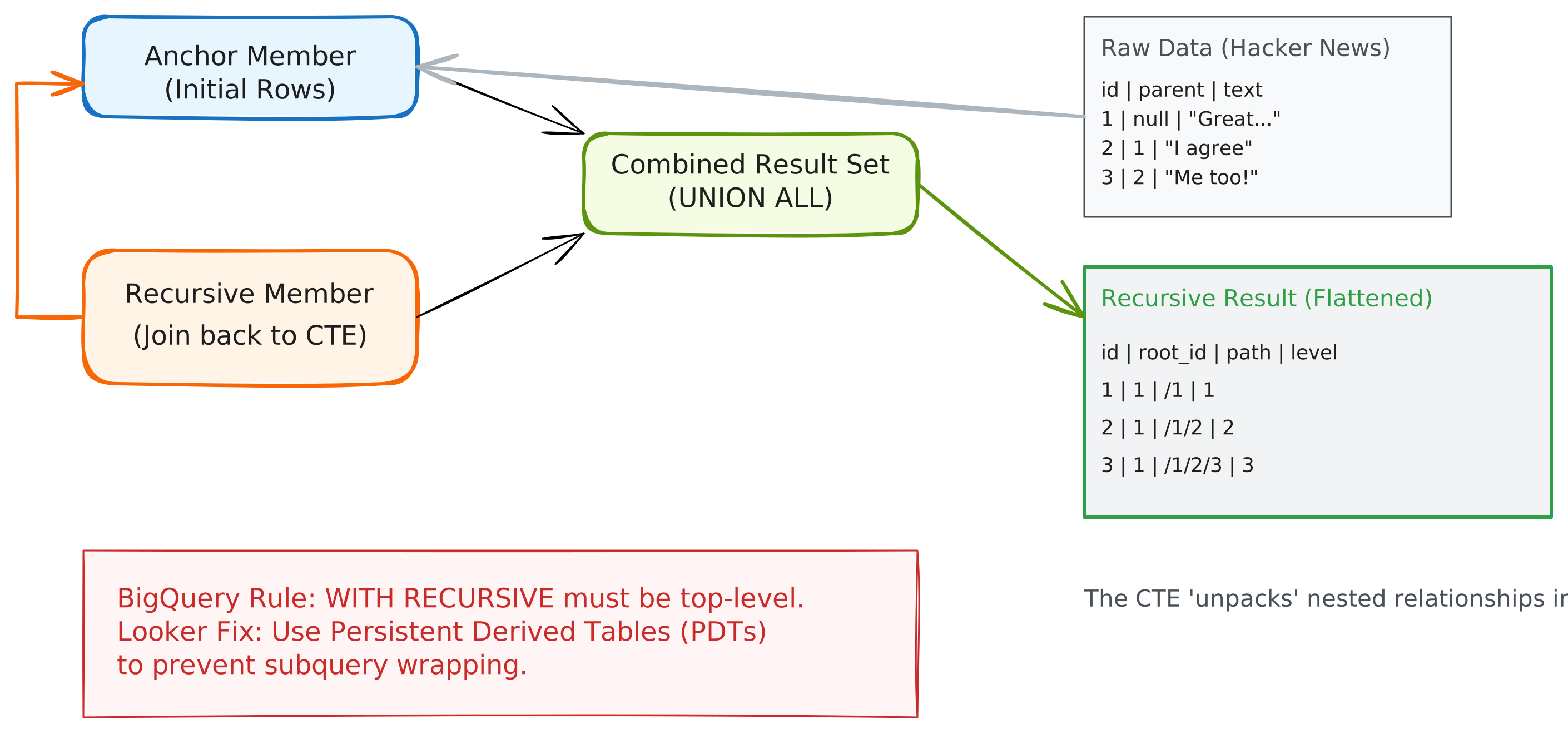
recursive-cte-flow-chart

Standard SQL joins fail here because they require you to know the number of levels upfront. Enter the Recursive Common Table Expression (CTE)—a powerful tool that allows a query to reference itself, iterating through levels until a termination condition is met.

In this guide, we’ll explore why recursive CTEs are a game-changer, how to implement them in BigQuery, and the specific architectural patterns required to make them work seamlessly in Looker.

Download the Code

Want to skip ahead and see the final LookML? Download the full source code here

Why Recursive CTEs?

Recursive CTEs are designed for hierarchical or graph-based data. Without them, you are often forced to write inefficient loops in a scripting language or perform multiple, expensive joins.

Top Use Cases:

  • Organizational Hierarchies: Finding every employee under a specific manager, regardless of level.
  • Network Analysis: Traversing a graph to find paths between nodes (e.g., "Degrees of Separation").
  • Threaded Conversations: Analyzing comment chains, replies, and sub-threads (our Hacker News example).
  • BOM (Bill of Materials): Exploding a product into all its constituent parts and sub-assemblies.

Recursive CTEs in BigQuery

BigQuery uses a standard syntax for recursion, consisting of three parts: the Anchor Member, the Recursive Member, and the Termination Condition.

The Syntax Pattern:

WITH RECURSIVE hierarchy AS (
-- 1. Anchor Member: Where do we start?
SELECT id, parent, 1 as level
FROM my_table
WHERE parent IS NULL

UNION ALL

-- 2. Recursive Member: How do we get to the next level?
SELECT child.id, child.parent, parent.level + 1
FROM my_table child
JOIN hierarchy parent ON child.parent = parent.id

-- 3. Termination: BigQuery has a hard limit of 500 iterations.
-- Ensure your join eventually returns no rows to stop.
)
SELECT * FROM hierarchy
BigQuery Constraint

WITH RECURSIVE MUST be at the very top level of your SQL statement. It cannot be inside a subquery. This leads to a small challenge in Looker we will overcome later.


The "Looker Trap" and the PDT Solution

When you define a SQL Derived Table in Looker, the generated SQL typically looks like this:

WITH my_derived_table (
SELECT ... -- Your Derived Table SQL here

)
SELECT ... FROM my_derived_table GROUP BY ... ORDER BY ...

If your Derived Table SQL starts with WITH RECURSIVE, Looker wraps it in a subquery, pushing the WITH clause down. BigQuery will reject this query.

The Solution: Persistent Derived Tables (PDTs)

To use recursive CTEs in BigQuery with Looker, you must use a Persistent Derived Table. When Looker builds a PDT, it uses a CREATE TABLE AS SELECT (CTAS) statement. Because the PDT build process executes the SQL as a standalone statement, the WITH RECURSIVE stays at the top level, and the query succeeds.

view: hn_hierarchy {
derived_table: {
datagroup_trigger: my_datagroup
# persist_for: "1 hour" # we recommend using a datagroup_trigger, but using persist_for works too
# Using a trigger or persist_for is mandatory to enable PDT behavior
sql:
WITH RECURSIVE hierarchy AS (
...
)
SELECT * FROM hierarchy ;;
}
}

Real-World Implementation: Hacker News

We analyzed the Hacker News dataset (47 million rows) to find the deepest comment threads. Using a recursive CTE joined to the main table, we uncovered fascinating insights:

  • Record Depth: The deepest thread reached 65 levels deep!
  • Pre-Aggregated Stats: By using a window function in our recursive view, we calculated total story comments as a dimension: COUNT(1) OVER(PARTITION BY root_id) as story_total_comments This allows users to sort by a story's total popularity while still viewing individual comment text in the same row.

A premium Looker implementation doesn't just show data; it provides a path to action.

Enable Detail Drills

Aggregated counts should always allow users to see the underlying rows. We enabled this by adding drill_fields to our recursive measures:

measure: count {
type: count
drill_fields: [id, parent, root_id, hacker_news.text]
}

Connect to Reality

Using Looker’s link parameter, we added external links to the original Hacker News articles. With the Google favicon lookup, the UI feels integrated and professional:

dimension: id {
link: {
label: "View on Hacker News"
url: "https://news.ycombinator.com/item?id={{ value }}"
icon_url: "https://www.google.com/s2/favicons?domain=news.ycombinator.com"
}
}

Hackernews Dashboard

Summary: Best Practices for Looker Developers

  • Materialize: Always persist recursive CTEs in BigQuery.
  • Window Functions: Use them within your CTE to pre-calculate hierarchy-wide stats for better Explore performance.
  • Liquid Guards: If using Query-Time Derived Tables (on other dialects), use {% condition %} to filter the anchor member early.

Recursive CTEs turn impossible data challenges into elegant LookML solutions. By understanding the warehouse-specific constraints and Looker's persistence model, you can unlock hierarchical insights that were previously out of reach.