Looker Access Token Reuse
Think of an access token like a corporate security badge. You wouldn't stand in line at the front desk to print a new visitor pass every time you walk through an interior door. Instead, you simply swipe your active badge until it expires.
Similarly, when your scripts or API services call Looker, they shouldn't authenticate from scratch on every request. Repeatedly logging into the API or logging in as a user (/login/:user endpoint) not only adds unnecessary latency but also creates token bloat that can degrade server performance at scale.
A simple token cache solves this. By storing access tokens locally, you restore active sessions instantly. Because Looker binds workspace state (Production vs. Developer Mode) directly to the session token, a user can maintain simultaneous dev and production tokens. Reusing a token already pinned to Developer Mode avoids the network round-trip of switching workspaces on every command.
If you are ready to implement this, jump directly to the code samples.
Technical Strategy
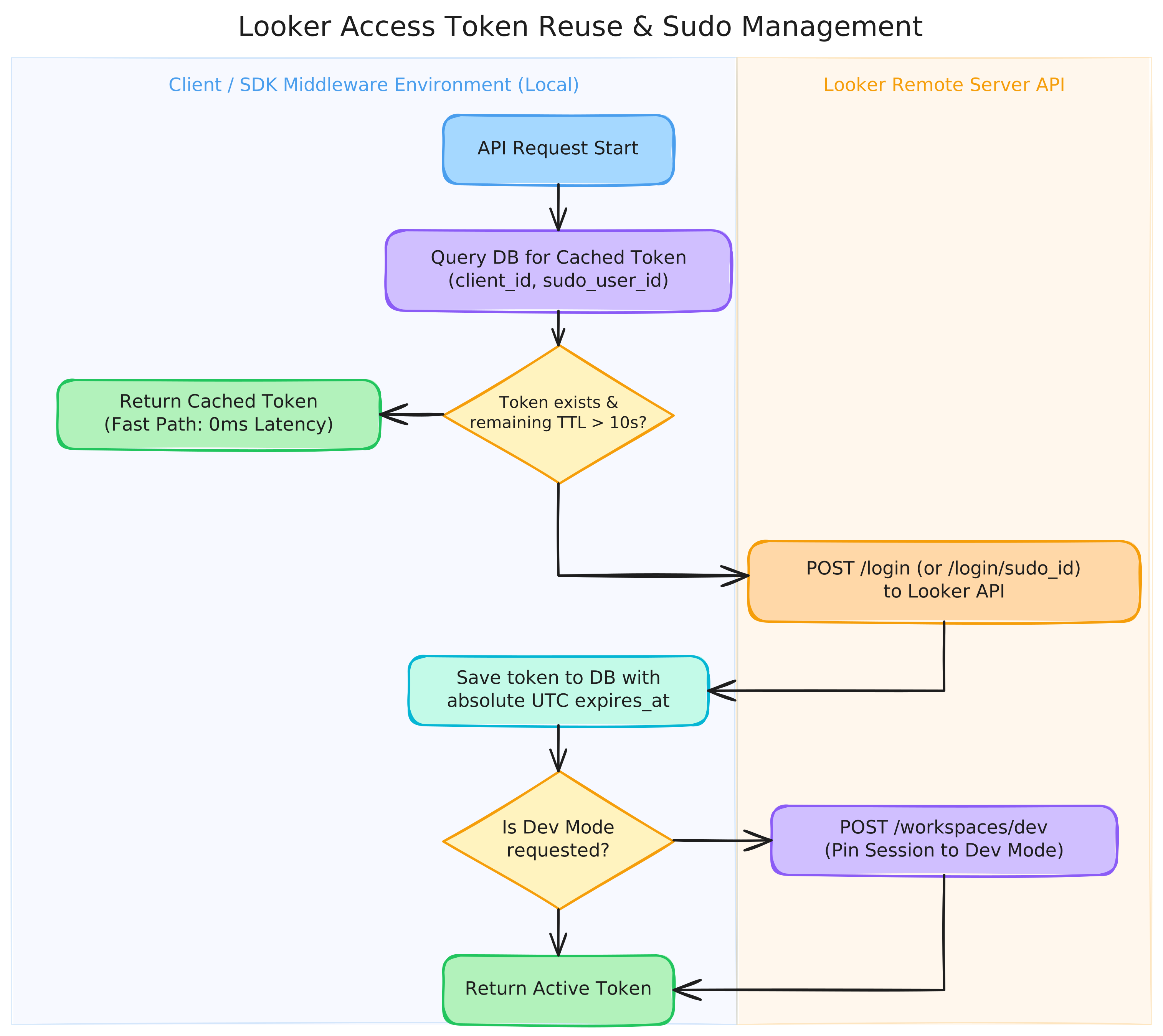
To make this work, the authentication layer acts as middleware checking three conditions:
- Is there a valid token in memory?
- Is there a valid token in the local database?
- If a cached token is found, does it have enough remaining lifetime (TTL)?
If yes, we reuse it. If not, we run a fresh API login, save the new token with an absolute UTC expiration timestamp, and switch the workspace to Developer Mode if running in a development environment.
By building this caching logic into your Looker SDK client, your application can seamlessly pull and reuse valid tokens, verify TTL, request new tokens when necessary, and manage workspace branches automatically:
Calculating TTL
Looker access tokens default to returning a relative expires_in duration (default 3600 seconds). If your database simply stores "3600", your script won't know when that countdown started. Instead, compute and store the absolute UTC expiration timestamp upon receipt.
When restoring a token, subtract the current time from the stored expiration timestamp. We recommend enforcing a 10-second safety margin to prevent the token from expiring mid-request.
Why Pin the Workspace to Developer Mode?
When executing scripts during development, you should switch your session to the dev workspace immediately after logging in. This is critical for three reasons:
- Testing uncommitted LookML: The SDK defaults to production. Setting the workspace to
devensures queries execute against draft models and enables development-only endpoints. - Isolating automation: Running validation or CI scripts in Developer Mode prevents work-in-progress changes from polluting production settings or impacting live business users.
- Reducing API round-trips: Switching workspaces requires a distinct API call. Restoring a cached token already flagged for
devmode avoids repeated network overhead.
Database Schema Suggestions
To support both standard and sudoed sessions, store tokens using a composite primary key of the client ID and target user ID:
CREATE TABLE IF NOT EXISTS token_store (
    client_id TEXT NOT NULL,
    sudo_user_id INTEGER, -- NULL for base client token; user ID for sudo sessions
    access_token TEXT NOT NULL,
    expires_at TEXT NOT NULL, -- Absolute UTC ISO8601 string or Unix timestamp
    PRIMARY KEY (client_id, sudo_user_id)
);
Complete Code Examples
- Python
- Go
import json
import logging
from typing import Optional

from looker_sdk.rtl import api_settings, auth_session, auth_token, serialize, transport
from looker_sdk.sdk.api40 import methods

logger = logging.getLogger(__name__)


class DatabaseTokenAuthSession(auth_session.AuthSession):
    """
    A custom Looker SDK AuthSession that attempts to reuse access tokens from a database
    before requesting a new one. It handles TTL properly by calculating the remaining
    token life relative to the absolute expiration time stored in the database.
    It supports both base client tokens and sudoed user tokens.
    """

    def __init__(
        self,
        settings: api_settings.PApiSettings,
        transport: transport.Transport,
        deserialize: serialize.TDeserialize,
        api_version: str,
        use_dev_mode: bool = True,
        sudo_user_id: Optional[int] = None,
    ):
        super().__init__(settings, transport, deserialize, api_version)
        self.use_dev_mode = use_dev_mode
        if sudo_user_id:
            self._sudo_id = sudo_user_id

    def _get_token(
        self, transport_options: transport.TransportOptions
    ) -> auth_token.AuthToken:
        """
        Retrieves a valid base token. Checks memory, attempts to restore from database,
        or performs a login.
        """
        # 1. Check if the in-memory token is still active (contains safety buffer)
        if self.is_authenticated:
            return self.token

        # 2. Attempt to restore token from the database
        restored_token = self._restore_token_from_db()
        if restored_token:
            self.token.set_token(restored_token)
            if self.is_authenticated:
                logger.info("Successfully restored active base token from database.")
                return self.token

        # 3. No active token in DB, delegate to super to authenticate and save
        return super()._get_token(transport_options)

    def _get_sudo_token(
        self, transport_options: transport.TransportOptions
    ) -> auth_token.AuthToken:
        """
        Retrieves a valid sudo token. Checks memory, attempts to restore from database,
        or performs a sudo login.
        """
        # 1. Check if the in-memory sudo token is still active
        if self.is_sudo_authenticated:
            return self.sudo_token

        # 2. Attempt to restore sudo token from the database
        restored_sudo_token = self._restore_sudo_token_from_db()
        if restored_sudo_token:
            self.sudo_token.set_token(restored_sudo_token)
            if self.is_sudo_authenticated:
                logger.info(
                    f"Successfully restored active sudo token for user {self._sudo_id} from database."
                )
                return self.sudo_token

        # 3. No active sudo token in DB, delegate to super to authenticate and save
        return super()._get_sudo_token(transport_options)

    def _login(self, transport_options: transport.TransportOptions) -> None:
        """Overridden login to automatically persist base tokens to the database."""
        super()._login(transport_options)
        if self.use_dev_mode:
            self._switch_to_dev_mode()
        self._save_token_to_db(self.token)

    def _login_sudo(self, transport_options: transport.TransportOptions) -> None:
        """Overridden sudo login to automatically persist sudo tokens to the database."""
        super()._login_sudo(transport_options)
        self._save_sudo_token_to_db(self.sudo_token)

    def _restore_token_from_db(self) -> Optional[auth_token.AccessToken]:
        """
        Placeholder logic to restore the base access token from your database.
        Calculate the remaining TTL (expires_in) dynamically.
        """
        # restore from your database using XYZ
        #
        # Example Implementation:
        # ----------------------------------------------------
        # client_id = self.settings.read_config().get("client_id")
        # # Query your DB for token and its absolute expires_at:
        # row = db.query(
        #     "SELECT access_token, expires_at FROM token_store WHERE client_id = ? AND sudo_user_id IS NULL",
        #     (client_id,)
        # )
        # if not row:
        #     return None
        #
        # # Parse stored absolute expiration and calculate remaining seconds
        # expires_at = datetime.datetime.fromisoformat(row["expires_at"])
        # now = datetime.datetime.now(datetime.timezone.utc)
        # remaining_ttl = int((expires_at - now).total_seconds())
        #
        # # Return the token only if it has remaining lifetime above safety threshold
        # if remaining_ttl > 10:
        #     return auth_token.AccessToken(
        #         access_token=row["access_token"],
        #         expires_in=remaining_ttl,
        #         token_type="Bearer"
        #     )
        # ----------------------------------------------------
        return None

    def _save_token_to_db(self, token: auth_token.AuthToken):
        """
        Placeholder logic to save the base access token and its absolute expiration time.
        """
        # save to your database using XYZ
        #
        # Example Implementation:
        # ----------------------------------------------------
        # client_id = self.settings.read_config().get("client_id")
        #
        # # Calculate absolute expiration time based on current time + TTL
        # now = datetime.datetime.now(datetime.timezone.utc)
        # expires_at = (now + datetime.timedelta(seconds=token.expires_in)).isoformat()
        #
        # db.execute(
        #     "INSERT OR REPLACE INTO token_store (client_id, sudo_user_id, access_token, expires_at) "
        #     "VALUES (?, NULL, ?, ?)",
        #     (client_id, token.access_token, expires_at)
        # )
        # ----------------------------------------------------
        pass

    def _restore_sudo_token_from_db(self) -> Optional[auth_token.AccessToken]:
        """
        Placeholder logic to restore the sudo access token from your database.
        Calculate the remaining TTL (expires_in) dynamically.
        """
        # restore from your database using XYZ
        #
        # Example Implementation:
        # ----------------------------------------------------
        # client_id = self.settings.read_config().get("client_id")
        # # Query your DB for token and its absolute expires_at:
        # row = db.query(
        #     "SELECT access_token, expires_at FROM token_store WHERE client_id = ? AND sudo_user_id = ?",
        #     (client_id, self._sudo_id)
        # )
        # if not row:
        #     return None
        #
        # # Parse stored absolute expiration and calculate remaining seconds
        # expires_at = datetime.datetime.fromisoformat(row["expires_at"])
        # now = datetime.datetime.now(datetime.timezone.utc)
        # remaining_ttl = int((expires_at - now).total_seconds())
        #
        # # Return the token only if it has remaining lifetime above safety threshold
        # if remaining_ttl > 10:
        #     return auth_token.AccessToken(
        #         access_token=row["access_token"],
        #         expires_in=remaining_ttl,
        #         token_type="Bearer"
        #     )
        # ----------------------------------------------------
        return None

    def _save_sudo_token_to_db(self, token: auth_token.AuthToken):
        """
        Placeholder logic to save the sudo access token and its absolute expiration time.
        """
        # save to your database using XYZ
        #
        # Example Implementation:
        # ----------------------------------------------------
        # client_id = self.settings.read_config().get("client_id")
        #
        # # Calculate absolute expiration time based on current time + TTL
        # now = datetime.datetime.now(datetime.timezone.utc)
        # expires_at = (now + datetime.timedelta(seconds=token.expires_in)).isoformat()
        #
        # db.execute(
        #     "INSERT OR REPLACE INTO token_store (client_id, sudo_user_id, access_token, expires_at) "
        #     "VALUES (?, ?, ?, ?)",
        #     (client_id, self._sudo_id, token.access_token, expires_at)
        # )
        # ----------------------------------------------------
        pass

    def _switch_to_dev_mode(self):
        """Switches the session workspace to Developer Mode."""
        config = self.settings.read_config()
        base_url = config.get("base_url")
        if not base_url:
            return

        url = f"{base_url}/api/{self.api_version}/session"
        try:
            logger.info("Switching session workspace to developer mode (dev)...")
            self.transport.request(
                method=transport.HttpMethod.PATCH,
                path=url,
                body=json.dumps({"workspace_id": "dev"}).encode("utf-8"),
                transport_options={
                    "headers": {
                        "Content-Type": "application/json",
                        "Authorization": f"Bearer {self.token.access_token}",
                    }
                },
            )
        except Exception as e:
            logger.warning(f"Failed to switch to dev mode: {e}")


def init_sdk(
    use_dev_mode: bool = True,
    sudo_user_id: Optional[int] = None,
) -> methods.Looker40SDK:
    """
    Initializes the Looker SDK with the custom DatabaseTokenAuthSession.
    Configured settings are automatically read from standard settings (environment or looker.ini).
    """
    settings = api_settings.ApiSettings()
    settings.is_configured()

    transport_inst = transport.RequestsTransport.configure(settings)

    custom_auth = DatabaseTokenAuthSession(
        settings=settings,
        transport=transport_inst,
        deserialize=serialize.deserialize40,
        api_version="4.0",
        use_dev_mode=use_dev_mode,
        sudo_user_id=sudo_user_id,
    )

    return methods.Looker40SDK(
        auth=custom_auth,
        deserialize=serialize.deserialize40,
        serialize=serialize.serialize40,
        transport=transport_inst,
        api_version="4.0",
    )


if __name__ == "__main__":
    logging.basicConfig(level=logging.INFO)

    # Example initialization (will print logs of actions taken)
    try:
        sdk = init_sdk(use_dev_mode=True, sudo_user_id=None)
        print("Looker SDK successfully initialized.")
    except Exception as e:
        print(f"SDK initialization failed: {e}")
package main

import (
	"bytes"
	"encoding/json"
	"fmt"
	"net/http"
	"net/url"
	"os"
	"strings"
	"sync"
	"time"
)

// LookerClient manages the Looker API connection and implements token reuse with sudo.
type LookerClient struct {
	BaseURL      string
	ClientID     string
	ClientSecret string
	SudoUserID   string
	UseDevMode   bool
	HTTPClient   *http.Client

	mu            sync.Mutex
	accessToken   string
	expiresAt     time.Time
	sudoToken     string
	sudoExpiresAt time.Time
}

// TokenResponse is the Looker API login response schema.
type TokenResponse struct {
	AccessToken string `json:"access_token"`
	ExpiresIn   int    `json:"expires_in"`
	TokenType   string `json:"token_type"`
}

// NewLookerClient creates a new LookerClient instance.
func NewLookerClient(baseURL, clientID, clientSecret, sudoUserID string, useDevMode bool) *LookerClient {
	return &LookerClient{
		BaseURL:      strings.TrimRight(baseURL, "/"),
		ClientID:     clientID,
		ClientSecret: clientSecret,
		SudoUserID:   sudoUserID,
		UseDevMode:   useDevMode,
		HTTPClient:   &http.Client{Timeout: 30 * time.Second},
	}
}

// GetToken returns a valid access token. If SudoUserID is configured, it obtains and
// returns a sudoed session token. Otherwise, it returns the base token.
// Both tokens are restored from/saved to the database.
func (c *LookerClient) GetToken() (string, error) {
	c.mu.Lock()
	defer c.mu.Unlock()

	// 1. Return base token if no sudo is requested
	if c.SudoUserID == "" {
		return c.getBaseToken()
	}

	// 2. Check if in-memory sudo token is active
	if c.sudoToken != "" && time.Until(c.sudoExpiresAt) > 10*time.Second {
		return c.sudoToken, nil
	}

	// 3. Restore sudo token from the database
	token, expiresAt, err := c.restoreSudoTokenFromDB()
	if err == nil && token != "" && time.Until(expiresAt) > 10*time.Second {
		c.sudoToken = token
		c.sudoExpiresAt = expiresAt
		return token, nil
	}

	// 4. Resolve base token to perform a fresh sudo login
	baseToken, err := c.getBaseToken()
	if err != nil {
		return "", err
	}

	// 5. Perform sudo login using the base token
	newToken, newExpiresAt, err := c.sudoLogin(baseToken)
	if err != nil {
		return "", err
	}

	c.sudoToken = newToken
	c.sudoExpiresAt = newExpiresAt

	// 6. Save the newly acquired sudo token to the database
	if err := c.saveSudoTokenToDB(newToken, newExpiresAt); err != nil {
		fmt.Printf("Warning: failed to save sudo token to database: %v\n", err)
	}

	return newToken, nil
}

// getBaseToken retrieves the active base token, restoring from DB or performing fresh login.
// Expects caller to hold the lock on LookerClient mutex c.mu.
func (c *LookerClient) getBaseToken() (string, error) {
	// 1. Check if in-memory token is active
	if c.accessToken != "" && time.Until(c.expiresAt) > 10*time.Second {
		return c.accessToken, nil
	}

	// 2. Restore token from the database
	token, expiresAt, err := c.restoreTokenFromDB()
	if err == nil && token != "" && time.Until(expiresAt) > 10*time.Second {
		c.accessToken = token
		c.expiresAt = expiresAt
		return token, nil
	}

	// 3. Perform a fresh login if no valid cached/stored token
	newToken, newExpiresAt, err := c.login()
	if err != nil {
		return "", fmt.Errorf("failed Looker login: %w", err)
	}

	c.accessToken = newToken
	c.expiresAt = newExpiresAt

	// 4. Save the newly acquired token to the database
	if err := c.saveTokenToDB(newToken, newExpiresAt); err != nil {
		fmt.Printf("Warning: failed to save token to database: %v\n", err)
	}

	// 5. Switch to dev mode if configured
	if c.UseDevMode {
		if err := c.switchToDevMode(newToken); err != nil {
			return "", fmt.Errorf("failed to switch to dev mode after login: %w", err)
		}
	}

	return newToken, nil
}

// restoreTokenFromDB retrieves the base token and absolute expiration time from the database.
func (c *LookerClient) restoreTokenFromDB() (string, time.Time, error) {
	// restore from your database using XYZ
	//
	// Example Implementation:
	// ----------------------------------------------------
	// var token string
	// var expiresAt time.Time
	//
	// row := db.QueryRow(
	//     "SELECT access_token, expires_at FROM token_store WHERE client_id = ? AND sudo_user_id IS NULL",
	//     c.ClientID,
	// )
	// err := row.Scan(&token, &expiresAt)
	// if err != nil {
	//     return "", time.Time{}, err
	// }
	// return token, expiresAt, nil
	// ----------------------------------------------------
	return "", time.Time{}, nil
}

// saveTokenToDB persists the base token and absolute expiration time to the database.
func (c *LookerClient) saveTokenToDB(token string, expiresAt time.Time) error {
	// save to your database using XYZ
	//
	// Example Implementation:
	// ----------------------------------------------------
	// _, err := db.Exec(
	//     "INSERT INTO token_store (client_id, sudo_user_id, access_token, expires_at) "+
	//     "VALUES (?, NULL, ?, ?) ON CONFLICT(client_id, sudo_user_id) DO UPDATE SET "+
	//     "access_token = excluded.access_token, expires_at = excluded.expires_at",
	//     c.ClientID, token, expiresAt,
	// )
	// return err
	// ----------------------------------------------------
	return nil
}

// restoreSudoTokenFromDB retrieves the sudo token and absolute expiration time from the database.
func (c *LookerClient) restoreSudoTokenFromDB() (string, time.Time, error) {
	// restore from your database using XYZ
	//
	// Example Implementation:
	// ----------------------------------------------------
	// var token string
	// var expiresAt time.Time
	//
	// row := db.QueryRow(
	//     "SELECT access_token, expires_at FROM token_store WHERE client_id = ? AND sudo_user_id = ?",
	//     c.ClientID, c.SudoUserID,
	// )
	// err := row.Scan(&token, &expiresAt)
	// if err != nil {
	//     return "", time.Time{}, err
	// }
	// return token, expiresAt, nil
	// ----------------------------------------------------
	return "", time.Time{}, nil
}

// saveSudoTokenToDB persists the sudo token and absolute expiration time to the database.
func (c *LookerClient) saveSudoTokenToDB(token string, expiresAt time.Time) error {
	// save to your database using XYZ
	//
	// Example Implementation:
	// ----------------------------------------------------
	// _, err := db.Exec(
	//     "INSERT INTO token_store (client_id, sudo_user_id, access_token, expires_at) "+
	//     "VALUES (?, ?, ?, ?) ON CONFLICT(client_id, sudo_user_id) DO UPDATE SET "+
	//     "access_token = excluded.access_token, expires_at = excluded.expires_at",
	//     c.ClientID, c.SudoUserID, token, expiresAt,
	// )
	// return err
	// ----------------------------------------------------
	return nil
}

// login handles authenticating via Client ID/Secret against the Looker API.
func (c *LookerClient) login() (string, time.Time, error) {
	loginURL := fmt.Sprintf("%s/api/4.0/login", c.BaseURL)

	form := url.Values{}
	form.Set("client_id", c.ClientID)
	form.Set("client_secret", c.ClientSecret)

	req, err := http.NewRequest("POST", loginURL, strings.NewReader(form.Encode()))
	if err != nil {
		return "", time.Time{}, err
	}
	req.Header.Set("Content-Type", "application/x-www-form-urlencoded")

	resp, err := c.HTTPClient.Do(req)
	if err != nil {
		return "", time.Time{}, err
	}
	defer resp.Body.Close()

	if resp.StatusCode != http.StatusOK {
		return "", time.Time{}, fmt.Errorf("login failed with status: %s", resp.Status)
	}

	var tokenResp TokenResponse
	if err := json.NewDecoder(resp.Body).Decode(&tokenResp); err != nil {
		return "", time.Time{}, err
	}

	expiresAt := time.Now().Add(time.Duration(tokenResp.ExpiresIn) * time.Second)
	return tokenResp.AccessToken, expiresAt, nil
}

// sudoLogin calls the Looker API to authenticate as a sudo user using the base token.
func (c *LookerClient) sudoLogin(baseToken string) (string, time.Time, error) {
	sudoURL := fmt.Sprintf("%s/api/4.0/login/%s", c.BaseURL, c.SudoUserID)

	req, err := http.NewRequest("POST", sudoURL, nil)
	if err != nil {
		return "", time.Time{}, err
	}
	req.Header.Set("Authorization", fmt.Sprintf("Bearer %s", baseToken))

	resp, err := c.HTTPClient.Do(req)
	if err != nil {
		return "", time.Time{}, err
	}
	defer resp.Body.Close()

	if resp.StatusCode != http.StatusOK {
		return "", time.Time{}, fmt.Errorf("sudo login failed with status: %s", resp.Status)
	}

	var tokenResp TokenResponse
	if err := json.NewDecoder(resp.Body).Decode(&tokenResp); err != nil {
		return "", time.Time{}, err
	}

	expiresAt := time.Now().Add(time.Duration(tokenResp.ExpiresIn) * time.Second)
	return tokenResp.AccessToken, expiresAt, nil
}

// switchToDevMode changes the workspace to Developer Mode for the given token.
func (c *LookerClient) switchToDevMode(token string) error {
	sessionURL := fmt.Sprintf("%s/api/4.0/session", c.BaseURL)
	payload := []byte(`{"workspace_id":"dev"}`)

	req, err := http.NewRequest("PATCH", sessionURL, bytes.NewBuffer(payload))
	if err != nil {
		return err
	}
	req.Header.Set("Content-Type", "application/json")
	req.Header.Set("Authorization", fmt.Sprintf("Bearer %s", token))

	resp, err := c.HTTPClient.Do(req)
	if err != nil {
		return err
	}
	defer resp.Body.Close()

	if resp.StatusCode != http.StatusOK {
		return fmt.Errorf("failed to switch to dev workspace, status: %s", resp.Status)
	}

	return nil
}

func main() {
	baseURL := os.Getenv("LOOKERSDK_BASE_URL")
	clientID := os.Getenv("LOOKERSDK_CLIENT_ID")
	clientSecret := os.Getenv("LOOKERSDK_CLIENT_SECRET")

	if baseURL == "" || clientID == "" || clientSecret == "" {
		fmt.Println("Error: LOOKERSDK_BASE_URL, LOOKERSDK_CLIENT_ID, and LOOKERSDK_CLIENT_SECRET must be set in the environment.")
		os.Exit(1)
	}

	// Initialize client using environment variables and an optional sudo user ID
	sudoUserID := "123" // pass user ID directly as a parameter to the client init
	client := NewLookerClient(baseURL, clientID, clientSecret, sudoUserID, true)
	fmt.Printf("Configured client with Sudo User ID: %s\n", client.SudoUserID)

	token, err := client.GetToken()
	if err != nil {
		fmt.Printf("Error obtaining Looker token: %v\n", err)
		return
	}

	fmt.Printf("Valid Looker Token retrieved successfully: %s...\n", token[:12])
}