Explore Agents across environments
Conversational analytics is taking off, with Looker customers rapidly adopting Conversational Analytics in Looker to let users query business data through natural language.
In a multi-instance setup (such as Dev, Stage, and Prod), promoting agents between environments requires synchronizing runtime metadata, prompt configurations, and golden queries across instances. While our GitHub Actions release workflow demonstrates a three-tier pipeline, the underlying migration script uses looker-cli and supports generic source and target endpoints across any number of environments.
TL;DR
You can run the migration script directly using looker-cli and curl:
# 1. Log in to both instances
looker-cli session login \
  --host "$LOOKER_SOURCE_BASE_URL" \
  --client-id "$LOOKER_SOURCE_CLIENT_ID" \
  --client-secret "$LOOKER_SOURCE_CLIENT_SECRET"

looker-cli session login \
  --host "$LOOKER_TARGET_BASE_URL" \
  --client-id "$LOOKER_TARGET_CLIENT_ID" \
  --client-secret "$LOOKER_TARGET_CLIENT_SECRET"

# 2. Run the migration script
curl -fsSL https://raw.githubusercontent.com/lkrdev/multi-instance-cicd-demo/main/scripts/migrate_agents_cli.sh | \
  LOOKER_SOURCE_BASE_URL="$LOOKER_SOURCE_BASE_URL" \
  LOOKER_TARGET_BASE_URL="$LOOKER_TARGET_BASE_URL" \
  bash -s -- config/content_agents_whitelist.yaml
The challenge of promoting agents
Promoting agents across instances presents several operational hurdles:
- Until agents and golden queries are codified in LookML, they remain runtime metadata objects managed through the UI and API rather than version-controlled text files in Git.
- Internal database IDs differ across environments, so an agent with ID 14 in dev or staging environments frequently has an entirely different ID on production.
- Agent names can be duplicated within an instance, which makes simple string-based matching unreliable for automated promotions.
- Golden query answers store share URLs referencing local query IDs, which break when copied to another instance where that query ID does not exist.
- Storing source IDs inside agent description fields clutters user-facing interfaces and breaks as soon as someone edits the prompt text.
- Managing an external database or committing state files into Git to track ID mappings across environments adds unnecessary deployment infrastructure.
Looker's native APIs and tooling cover all of these requirements in a short shell script. By combining looker-cli with Looker's built-in Artifact API and query endpoints, you can handle cross-instance ID mapping, query replication, and idempotent promotions without external databases or extra infrastructure.
Promotion architecture
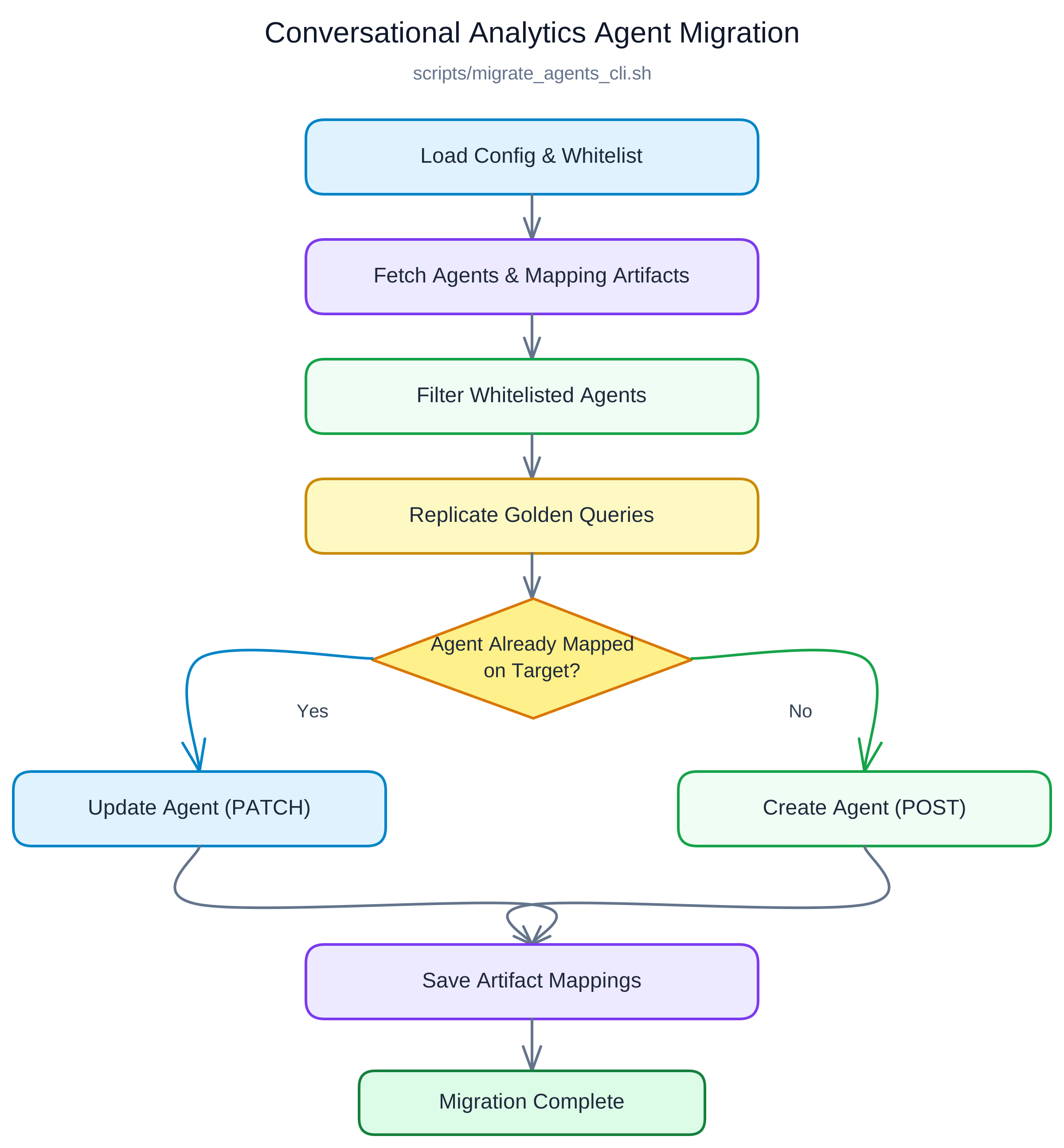
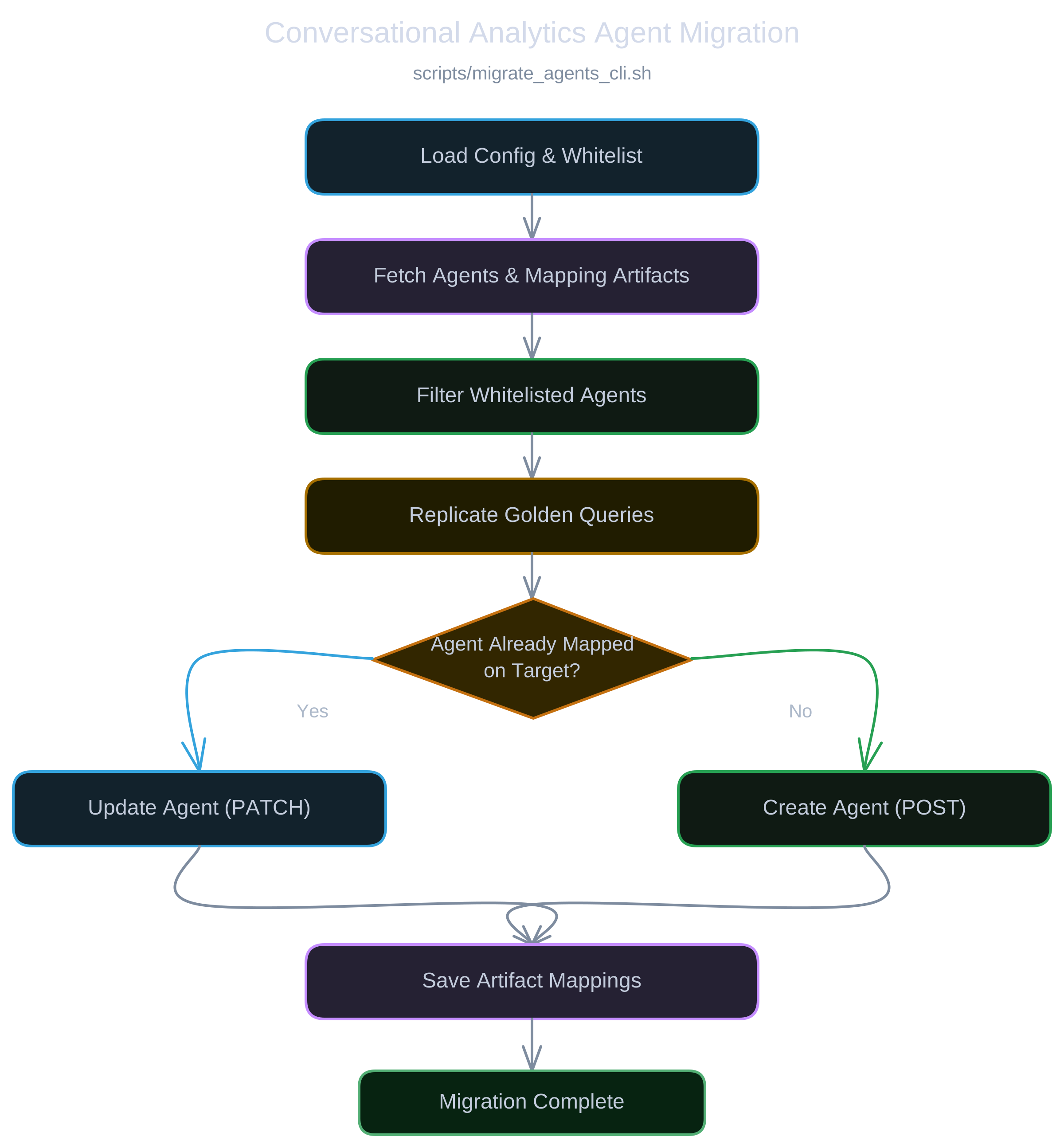
The migration script reads whitelisted agents from the source instance, syncs ID mappings using Looker's built-in Artifact API on the target instance, replicates query definitions, and applies updates.
Understanding golden queries
Golden queries, sometimes called verified queries, anchor conversational data agents to ground-truth results. They tell the model: "When a user asks this type of question, this specific Explore query produces the correct answer."
There are three main ways to define them:
- Through the Looker UI, analysts run queries in the Explore interface, verify the output, and attach the verified query directly to an agent during user acceptance testing.
- Through agent context, modelers provide structured system prompts, business definitions, and field instructions to establish domain terminology and baseline calculation rules.
- Through the API, developers create and manage queries programmatically using the create_golden_query endpoint, supporting automated test suites, version-controlled query libraries, and CI/CD migration scripts.
Whitelisting production releases
Dev or staging environments frequently accumulate experimental agents and test queries created during user acceptance testing. You do not want every scratchpad agent automatically promoted to production.
A configuration file at config/content_agents_whitelist.yaml defines which agents migrate:
agents:
  - "eCommerce"
If an agent is not listed in the whitelist, the script skips it.
Storing migration state in the Artifact API
Maintaining a persistent mapping between source and target entities is critical for idempotent promotions. Because Looker assigns new internal database IDs whenever an agent or golden query is created on another instance, the migration script must remember which target ID corresponds to each source ID across releases. Without a persistent mapping, subsequent deployments would either duplicate existing agents or rely on fragile display name matching.
Instead of managing an external database or committing state files into Git, the script stores this cross-instance metadata directly on the target instance using Looker's built-in Artifact API (/api/4.0/artifacts/). The Artifact API provides an isolated key-value store, allowing the script to read existing entity mappings at the start of a run and write updated relationships back to the target instance upon completion. This keeps deployment state entirely within Looker, ensuring consistent updates whether run locally or in automated pipelines.
Replicating golden queries on the target instance
In typical workflows, data teams and analysts create golden queries manually in the lower environment (dev or staging) through the Looker Explore interface while validating answers during user acceptance testing. Once verified, the release process promotes them programmatically to the target instance.
Each golden query contains a natural language question, an active status flag, and an answer URL pointing to a Looker query. Because query IDs are local to the instance where they were run, the answer URL from dev or staging cannot be copied directly. The script extracts the underlying query structure (model, Explore, fields, filters, pivots, and sorts) from the source query and recreates it on the target instance using create_query. Once Looker generates a valid target share URL, the script calls create_golden_query and records the newly generated target ID in the mapping store.
Upserts and query pruning
Once golden queries are resolved, the script checks whether the agent exists on the target instance:
- If the agent already has a mapped target ID, the script updates the agent using
update_agent(PATCH) with the latest prompt instructions, context, and golden query IDs. - If the agent is not yet mapped on the target, the script registers a new agent using create_agent (POST) and stores the new ID in the artifact map.
If an analyst deletes an obsolete golden query on the source instance, the script prunes it from the target instance using delete_golden_query and removes it from the mapping.
At the end of the run, the script writes the updated mappings back to the target Artifact API in a single payload.
[!NOTE] Deleting an agent on the target instance remains a manual administrative step. While the script automatically prunes deleted golden queries from existing agents, it does not delete entire agents from target environments to prevent accidental removals of production configurations.
Release pipeline integration
This migration can run as an automated step in a broader release pipeline. In our demo repository, the step executes in GitHub Actions after LookML tests, content validation, and settings drift checks pass:
- name: Promote Conversational Analytics Agents (Stage > Prod via Looker CLI)
  env:
    LOOKER_SOURCE_BASE_URL: ${{ secrets.LOOKER_STAGE_BASE_URL }}
    LOOKER_TARGET_BASE_URL: ${{ secrets.LOOKER_PROD_BASE_URL }}
  run: |
    bash scripts/migrate_agents_cli.sh config/content_agents_whitelist.yaml